
app.oddsrail/polymarket-kalshi-trading
Cross-venue prediction markets for AI agents: Polymarket + Kalshi, costed and attributed
Links
README
From the repo.
oddsrail
Give your AI agent Polymarket tools, with local signing and spending limits.
oddsrail is an open-source MCP server. It gives Claude, Cursor or any MCP
client live market data, costed fills and order routing on Polymarket.
Operator-set guards enforce order limits. A separate deterministic
check_order tool reviews the market, outcome and price before submission;
ask your agent to call it before each order. It cannot guarantee that an
agent will choose or execute a sound strategy.
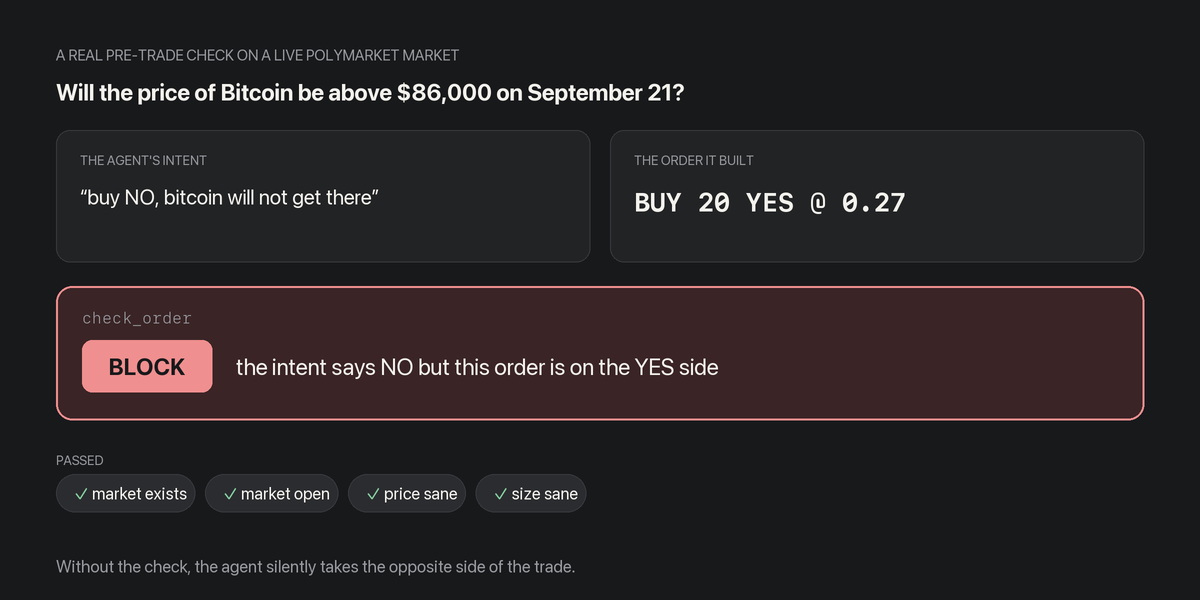
That is a real check_order result on a live market, not a mock-up. The agent
meant NO and built a YES order. Without the check it would have taken the
opposite side of the trade, and nothing would have told it.
- Review before submitting.
check_orderchecks the market, side, price and venue minimum. Operator guardrails run in the order path; calling the separate review tool remains the agent's responsibility. - Non-custodial. Your keys stay on your machine. Everything starts in dry-run, with a paper ledger filled against the live order book.
- Free, at 0 bps. oddsrail adds nothing to your trade; see how it is funded.
Read the OddsRail documentation for setup, wallets, trading limits and developer notes.
Claude Desktop: install without Python
Download OddsRail 0.18.1 for Claude Desktop. Open the file in Claude Desktop, or install it from Settings, Extensions. A current Claude Desktop version with MCPB/uv support supplies the local Python runtime. The extension starts with Paper trading ticked and needs no wallet key to explore markets or simulate orders.
For real orders, use an existing funded Polymarket account with trading approvals. Enter its signer private key only in the extension's settings, never in a chat or the website, and enter the trading account's public wallet address. Claude Desktop stores sensitive settings using its secure storage; the local OddsRail process receives the key for signing. Review your account, limits and proposed order before deliberately unticking Paper trading.
The defaults are $25 per order and $100 of submitted order notional per local server session. Restarting the extension resets the session budget. These are not daily loss or account-wide limits. Venue fees may apply.
The extension gives Claude local trading tools. Website strategy drafts can be handed to Claude for review; installing the extension does not import those rules or start an autonomous background agent. Keep Claude Desktop and your computer running while using the tools. Hosted website trading is a limited pilot: a Deposit Wallet session key plus an owner allowlist on the server, quoting one market at a time.
Developer quickstart
Python 3.11+ required.
pip install oddsrail
claude mcp add --transport stdio oddsrail -- oddsrail
Or from a clone, without installing:
python3 -m venv .venv && .venv/bin/pip install -r requirements.txt
claude mcp add --transport stdio oddsrail -- /abs/path/to/oddsrail/.venv/bin/python -m oddsrail.server
Then ask the agent: "search markets about the World Cup final and run the overshoot signal on the favorite".
Install in one step
| Client | How |
|---|---|
| Claude Desktop (local tools, default simulation) | Download the extension. No Python installation needed. |
| Claude web or desktop, nothing to install (hosted, paper trading) | Settings, Connectors, Add custom connector, URL https://mcp.oddsrail.app/mcp, then sign in with your email. See Hosted. |
| Claude Code (hosted, paper trading) | claude mcp add --transport http oddsrail https://mcp.oddsrail.app/mcp |
| Claude Code (plugin, with the four workflow skills) | claude plugin marketplace add hmesutozsoy/oddsrail then claude plugin install oddsrail@oddsrail |
| Claude Code (server only) | claude mcp add --transport stdio oddsrail -- uvx oddsrail |
| Any agent that reads skills | npx skills add hmesutozsoy/oddsrail |
| Cursor | Install oddsrail in Cursor |
| VS Code | Install oddsrail in VS Code |
| Anything else that speaks MCP over stdio | {"command": "uvx", "args": ["oddsrail"]} (or pip install oddsrail and run oddsrail) |
The plugin and the one-click links launch the server with uvx, so they
need uv on the machine. Without uv, pip install oddsrail gives you an oddsrail command to point any client at.
Everything starts in dry-run.
The four skills (skills/*/SKILL.md) are generated from the server's own
MCP prompts by scripts/gen_skills.py, and a test fails if they drift, so a
skill and the prompt it mirrors can never disagree.
How oddsrail compares
Verified against each alternative directly (their repos, live endpoints, and registry entries, September 2026), not from their marketing:
| oddsrail | raw venue APIs | pmxt | Simmer | Polymarket agent-skills | |
|---|---|---|---|---|---|
| What it is | self-hosted MCP server | the venues themselves | unified API + SDK + MCP, "CCXT for prediction markets" | agent trading platform + SDK + MCP | markdown skill docs for agents |
| Custody | non-custodial; keys never leave your machine | yours | hosted mode: "PMXT handles custody, signing infrastructure"; self-hosted mode: your keys | self-custody, local signing | yours (documentation only) |
| Attribution you control | yes: ODDSRAIL_BUILDER_CODE overrides the 0 bps default | n/a | not documented | not documented | documents builder headers for your own code |
| Cost to the trader | 0 bps, free tools | free | hosted pricing not in the README | not documented | free |
| Open source | MIT, full source | n/a | MIT, ~2.1k stars | not stated | docs; license not stated |
| Operator guardrails | notional caps, open-order cap, allowed markets; enforced pre-request, in dry-run too | none | not documented | per-trade limits, daily caps, stop-loss/take-profit, kill switch | none |
| Paper trading | dry-run fills against the live book, P&L | none | not documented | virtual $SIM sandbox, then graduate to real money | none |
| Book-walked cost, settlement audit, jurisdiction-classified failures, dated venue-quirk notes | yes, all four | no | not documented | not documented | quirks partly documented |
| Realtime | watch_book, bounded | websocket, yours to wire | not documented in the README | not documented | websocket documented |
Verified 2026-09-02 from each project's own README or docs (pmxt: github.com/pmxt-dev/pmxt; Simmer: docs.simmer.markets; agent-skills: github.com/Polymarket/agent-skills). "Not documented" means exactly that, not "absent". Re-check before quoting; these projects move.
The wedge, in one line: pmxt is the reference for trading everywhere; Simmer is the reference for an agent economy with a sandbox and a reputation layer; oddsrail is the reference for trading correctly, non-custodially, with attribution you own.
Where the others are honestly ahead: pmxt offers broader venue coverage for trading and data, with hosted convenience and a community many times ours. Simmer has a virtual-balance sandbox, stop-loss and take-profit rails we do not have, a public reasoning/reputation layer, and a strategy-skills marketplace. Polymarket's agent-skills is the venue's own documentation and covers bridging and deposits, which oddsrail does not.
The raw Polymarket API has the endpoints. It also models rejections as
ok:false return values, orders its books worst-first, ships a trades
endpoint that returns the market's public tape, and enforces an
undocumented $1 minimum notional. oddsrail exists because we hit every one of
those and encoded the fix.
Free to use, and free of fees
oddsrail ships with a project builder code
registered at 0 bps, so orders routed through it are attributed without
adding a single basis point to anyone's trade. The project's income is a share
of Polymarket's weekly builder reward pool, paid by Polymarket's own program,
not by you. Running your own builder profile instead is one environment
variable (ODDSRAIL_BUILDER_CODE), and server_info always tells you which
code is in use. No fee tiers, no paywalled tools, no account required.
Hosted: nothing to install
mcp.oddsrail.app runs the same server as a remote MCP endpoint with
accounts, so an agent inside Claude can use it without a machine of its own.
Add the URL as a custom connector (Pro, Max, Team and Enterprise plans), sign
in with your email when Claude asks, and every call from then on carries
your account.
What the hosted server is, in one breath: Polymarket market data, the signal
tools, check_order, and paper trading with a $1,000 virtual bankroll per
account, filled against the live book. What it is not: a place where money
moves. It holds no wallet keys and executes no real order. Account-scoped
tools such as
open_orders and the gasless relayer tools are absent, because on a shared
server they would describe nobody's account. Twenty-four tools remain: the
public-data and paper tools plus arena_register, arena_unregister and
arena_status, which put the account's paper ledger on the public board.
Live trading from Claude stays self-hosted: pip install oddsrail with your own
key, and the same place_order posts real orders when you set
ODDSRAIL_DRY_RUN=0. The hosted runner is separate: see
docs/live-execution.md.
The paper ledger you build up in Claude is yours to reset with
paper_reset; nothing else about the account exists. Privacy policy:
oddsrail.app/privacy. Source:
oddsrail/cloud/ and oddsrail/hosted.py; deployment notes in
deploy/cloud/.
Builder page and competition
Build your agent by choosing strategies, markets and risk limits. The final step saves the draft and opens Claude Desktop setup, with the installer and a strategy brief that preserves your settings.
The brief asks Claude for read-only review. It does not install a strategy, start an autonomous runner or enforce the builder's requested daily-loss, exposure or market rules. Local live trading needs separate account setup, operator guards and explicit authorization. Hosted agent activation needs a session key for a Deposit Wallet and, during the pilot, an allowlisted owner.
The agent competition is coming soon. Entries are not open. The proposed format uses equal starting capital and a shared set of markets; dates and final rules will be published before entries open.
How attribution works (CLOB V2, verified Aug 2026)
- Get your builder code (a bytes32) at polymarket.com → Settings → Builders. Set your fee rates there: taker up to 100 bps, maker up to 50 bps, additive on top of platform fees, settled to your builder wallet.
export ODDSRAIL_BUILDER_CODE=0x...where the server runs.- Every order any agent routes through
place_orderhas the code placed in the V2 order struct'sbuilderfield before signing, so attribution is on-chain, visible in everyOrderFilledevent on CTF Exchange V2. - Verify with the
builder_statstool (public builder-trades endpoint + leaderboard).
If you skip this, orders carry the bundled oddsrail builder code
(0xa576c5ce…, registered at 0 bps maker / 0 bps taker), costing you nothing
and funding the project. If you set your own, yours wins; the default is a
default, not a lock-in.
The oddsrail builder profile is Verified in Polymarket's builder program (2026-09-02), and Polymarket's builder team confirmed builder-code attribution as the right pattern for a self-hosted, non-custodial tool: no keys ship with the product, and the code is attached and signed by the operator's own wallet.
Environment variables
| Variable | Default | Meaning |
|---|---|---|
ODDSRAIL_DRY_RUN | 1 | 1 = orders are simulated and returned, never posted. Set 0 to trade. |
ODDSRAIL_BUILDER_CODE | project default | Your bytes32 builder code. Overrides the bundled project default so attribution (and any reward-pool share) accrues to you instead. |
POLYMARKET_PRIVATE_KEY | unset | Operator wallet key; required only for real trading. Never leaves this machine. |
POLYMARKET_WALLET_ADDRESS | unset | Proxy/deposit wallet address, if the account uses one. |
POLYMARKET_RELAYER_API_KEY | unset | Your own Relayer API key (polymarket.com → Settings → Relayer API keys), for gasless split_position / merge_positions / redeem_positions. |
POLYMARKET_RELAYER_API_KEY_ADDRESS | unset | The address the relayer key was issued for. Both halves are required; without them the gasless tools send nothing. |
ODDSRAIL_MAX_ORDER_NOTIONAL | unset | Guardrail: max USDC notional per order. Enforced before any request, in dry-run too. |
ODDSRAIL_MAX_SESSION_NOTIONAL | unset | Guardrail: max cumulative notional of live orders submitted by this server process. |
ODDSRAIL_MAX_OPEN_ORDERS | unset | Guardrail: max resting orders on the account (live; checked against the venue before placing). |
ODDSRAIL_ALLOWED_MARKETS | unset | Guardrail: comma-separated allowed market identifiers. For Polymarket, use exact outcome token IDs. Anything else is refused. |
ODDSRAIL_PAPER | 1 | Paper-trade dry-run Polymarket orders against the live book. 0 disables. |
ODDSRAIL_PAPER_LEDGER | ~/.oddsrail/paper.json | Where the paper ledger lives. One local JSON file. |
ODDSRAIL_PAPER_BANKROLL | 1000 | Starting paper cash in USDC. |
Status
Tests: the 0.18.1 release and its test-only follow-up passed 1,356 Python tests on Python 3.11, 3.12 and 3.13, plus 119 JavaScript tests. Coverage includes spending limits, concurrent submissions, order reconciliation, book walking, sizing, dry-run behavior, wallet authentication and the builder handoff. See the testing guide for the locked environment and commands.
Release verification: the installer launch command installed the published PyPI package and completed a real MCP session. Default and unexpected mode settings stayed in simulation. No funded orders were placed during that release check; installation through Claude Desktop's interface and funded trading still need testing.
Earlier Polymarket integration checks, including attributed orders and gasless position management, are recorded in the live verification notes.
Where this works
Two different things can stop oddsrail from trading, and they have opposite remedies. One is a venue restriction, enforced at the order. The other is a network filter, which breaks the connection itself.
Polymarket restrictions. Polymarket publishes its restricted-jurisdiction list as an API reference: https://docs.polymarket.com/api-reference/geoblock. There are three tiers. OFAC-sanctioned jurisdictions (Iran, Syria, Cuba, North Korea, and the Crimea, Donetsk and Luhansk regions of Ukraine) are blocked on both the frontend and the API, with no new orders and no closing of existing positions. A longer second tier is close-only on both the frontend and the API: existing positions can be closed, new ones cannot be opened. It includes the United States, the United Kingdom, France, Germany, Italy, Poland, Slovakia, Belgium, Singapore, Australia, New Zealand, Brazil, Russia, Taiwan, Thailand and the Canadian provinces of Ontario, Quebec, British Columbia and Alberta. A third group, Ireland, Japan, Malta (sports only) and the Netherlands, is close-only on Polymarket's frontend, with the API explicitly not restricted.
Note the shape of that failure: it lands on the order, not the connection. Public reads answer normally, so oddsrail will look like it is working right up until an order is rejected. Verified against Polymarket's documentation on 2026-08-31; Polymarket updates the list without notice, so read the URL rather than this paragraph.
The United States. polymarket.com, the venue oddsrail talks to, is close-only for the US. Polymarket separately operates Polymarket US (polymarket.us), run by QCX LLC as a CFTC-regulated Designated Contract Market. oddsrail does not support it. It is a different API host, a different authentication model (API-key headers rather than EIP-712 wallet signatures), a different SDK and a different funding rail. A polymarket.us account and its keys will not work with this server.
Network filters. Separately from any venue rule, a national filter can block the domains outright. Turkey does this: Polymarket does not restrict Turkey, but Turkish ISPs block polymarket.com. That is a connectivity problem, not an eligibility one, and it looks different: DNS failures, TLS errors, resets, or an ISP interstitial page served where JSON was expected. oddsrail classifies both shapes and tells the calling agent which one it hit.
Eligibility is the operator's, not the tool's. oddsrail is self-hosted
and non-custodial, which is a real advantage and also means you hold the
account and you make the venue's representations; there is no intermediary
making them for you. Polymarket's trading flow requires an attestation that
you are not a U.S. person, are not located in a restricted jurisdiction, and
are not "using a VPN or other measures to circumvent or attempt to
circumvent" restrictions, and states that Polymarket reserves the right to
put a non-compliant wallet in close-only mode. server_info reports
Polymarket's geoblock verdict for this machine's IP, but a technical probe is
not a compliance
check: the terms bind on residence, citizenship and incorporation, not on
egress IP. Read the terms; if any of this matters to you, get your own legal
advice. Nothing here is legal advice.
The signal logic, the MCP layer and the whole test suite run fine offline regardless.
Guardrails: limits the agent cannot argue with
Anyone handing keys to an agent wants three things first: a cap on one order, a cap on a session, and a fence around which markets it may touch. All three are operator-set environment variables (table above), enforced before any request goes out, in dry-run as well as live, so the agent meets the fence in rehearsal. A refusal is a structured answer that names the rule, the limit and the request:
{"accepted": false, "blocked_by": "guardrail", "rule": "max_order_notional",
 "limit": 25.0, "requested": 99.5, "note": "refused by an operator-set guardrail ... Nothing was sent."}
The session counter lives in the server process; restarting it resets the
budget, which is the operator's call. server_info reports the active limits
and how much of the session budget is used.
Paper trading: dry-run with a memory
By default, every dry-run Polymarket order is filled against the live
order book, walked within the limit price; whatever does not fill rests as a
paper order and fills later if the market crosses it. paper_positions
reports cash, positions at current marks, realized and unrealized P&L and the
resting paper orders; paper_reset starts over. The ledger is one local JSON
file. Be clear about what this is: fills assume no queue position, no latency,
no market impact and no fees, so paper results are an upper bound on the same
strategy live.
Realtime: watch the book move
watch_book(token_id, seconds, max_events) subscribes to a token's realtime
stream and returns the events that arrived (book snapshot, then price changes
and trades), bounded to at most 60 seconds so an agent cannot hang a session
on a quiet market. Use it after get_orderbook when the decision depends on
the book moving, not just where it is.
If the stream fails with CERTIFICATE_VERIFY_FAILED while the REST tools
work, your Python has no CA bundle (common with python.org macOS installs).
oddsrail classifies that as local_tls and tells the agent the fix: run
Install Certificates.command from the Python folder in /Applications, or
set SSL_CERT_FILE to the path printed by python -m certifi.
Gasless position management (relayer)
Three tools move collateral without paying gas, through Polymarket's relayer:
split_position (USDC → a full YES+NO set), merge_positions (matching
YES+NO → USDC, or max), and redeem_positions (a resolved market's winning
shares → USDC). All three respect dry-run and return the relayer transaction
id and hash plus the terminal outcome.
They use your own Relayer API key, created at polymarket.com → Settings →
Relayer API keys and exported as POLYMARKET_RELAYER_API_KEY +
POLYMARKET_RELAYER_API_KEY_ADDRESS. That is the pattern Polymarket's builder
team recommends for a self-hosted tool: no builder secret ships with oddsrail,
and each operator authenticates the relayer as themselves. Relayer limits are
per builder tier: 100 requests/day unverified, 10,000 verified. Without the
key the tools return a structured "not configured" answer and send nothing;
they never fall back to a gas-paying broadcast from the signer.
Exercised live (2026-09-02): a 1 USDC split and the matching merge went
through the relayer from this code, gasless, on the maintainer's test account
with its own Relayer API key. Relayer ids and Polygon transaction hashes are
in docs/live-proof.md. redeem_positions is still
unproven live: it needs a resolved market with winning shares, which that
account has not held yet. redeemable_positions lists what the configured
wallet could redeem or merge right now, and the settle_resolved prompt
chains the two.
Market discovery and trade costs
find_markets(query, venues="polymarket"): searches Polymarket and returns normalized market IDs, titles, outcome prices, bid/ask prices, spread, volume and close time. Set the venue explicitly for this workflow.quote_cost("polymarket", market_id, side, size): walks the order book for the requested share size. Returns average fill price, slippage, notional, levels consumed, whether the size is fillable, and the market's fee schedule where published.
Order lifecycle & discovery
order_status(order_id): resting / partially_filled / filled / gone, with size_matched. The answer an agent needs after place_order.my_fills(),my_positions(): the operator's executions and holdings, no address juggling. (Fills come from the Data API activity feed; the SDK's list_account_trades returns the market's public tape and is not used.)cancel_all_orders(): kill switch, flattens every resting order at once.resolution_criteria(venue, market_id)returns the full resolution contract: what resolves YES, who resolves it, from which sources. Read it before trusting a price.closing_soon(hours, venues="polymarket"): Polymarket markets closing within N hours, where activity concentrates.
Workflow prompts
MCP prompts show up in clients as ready-made workflows, and they encode the order of operations that keeps an agent out of trouble; the sequencing is the expertise, which a flat tool list cannot convey.
/find_fade_setup(query, bankroll): signal → book → cost → resolution → size → dry-run, with the rejection criteria at each step/daily_review: positions, resting orders, fills, closing-soon, attribution
Pre-trade checks and sizing
check_order(venue, market_id, side, price, size, intent): the last step beforeplace_order. Deterministic checks of the proposed order against the operator's own words and the live market: does the market exist and accept orders, do the intent's words match the market and the YES/NO side, is the price sane against the book, is the size above Polymarket's $1 minimum and inside the guardrails, is there liquidity within the limit, is a resolution source named. Returnsok/caution/blockwith the evidence per check and a one-line read-back. No second model judges anything; nothing is sent.position_size(bankroll_usd, price, fair_value): fractional-Kelly sizing, capped, refusing negative-edge bets, returning its own assumptions.
Polymarket tool highlights
search_markets,get_market,get_orderbook,price_history,get_positions: read-only, no keysovershoot_signal, premium: fresh panic-jump detection + this market's historical reversion tendency (ported from the polymarket-wc analyzer)dispute_risk, premium: transparent 0–100 heuristic for contested (UMA-dispute-prone) resolutionsplace_order,cancel_order,open_orders: trading, dry-run by default.priceis a probability in (0,1),sizeis in SHARES, and the exchange enforces a $1 minimum notional on marketable orders. Trading tools carrydestructiveHintannotations so clients can gate them.builder_stats: attribution verification + public builder leaderboardfind_markets,quote_cost: market discovery and trade costs (above)server_info: server mode, configured credentials and operator guardrails
Stack notes
- Official unified SDK
polymarket-client(0.6.x):AsyncPublicClientfor data,AsyncSecureClient.place_limit_order(..., builder_code=...)for attributed orders. The legacypy-clob-clientis archived and cannot attach builder codes. Do not use it. - MCP SDK 2.0:
MCPServerfrommcp.server.mcpserver(the oldmcp.server.fastmcp.FastMCPimport is gone in 2.x). - x402 (planned): the official
x402PyPI package (v2.20+) can wrap MCP tools directly (x402.mcp, payment rides in tool-call_meta), but its MCP helpers currently target mcp 1.x, so integrating means pinningmcp>=1.28,<2or waiting for the 2.x-compatible release. Mainnet settlement needs a facilitator (Coinbase CDP: 1,000 free settlements/mo, then $0.001). Keep free tiers of both signals so registries can index the server.
Who this is for
Polymarket's public builder leaderboard shows what a single operator routing
their own flow is worth. Pulled 2026-08-31 via this server's own
builder_stats tool. Re-run it, the numbers move:
| weekly volume | |
|---|---|
| #1 (traderline) | $7.70M |
| median of top 25 | $533K |
| entry to top 25 | $140K |
The instructive rows are the small ones: MagicMarkets routes $901K/week with a single active user; Jupiter $515K with one; Sharkbetting $1.15M with two. Those are bot operators routing their own flow, which is exactly who this is built for.
Roadmap
Live smoke test from an unblocked network: done 2026-08-23, all tools pass- Register builder code (polymarket.com → Settings → Builders), set fees to
0 bps at launch, export
ODDSRAIL_BUILDER_CODE; first attributed order on a tiny size - x402 paid wrapping for the two signals once the mcp-2.x conflict clears
Config for your environment
Use the endpoint URL below in your config. No API key — you connect directly.
Tool
OS
Config file: ~/.cursor/mcp.json
{
  "mcpServers": {
    "mcp-server": {
      "url": "https://mcp.oddsrail.app/mcp"
    }
  }
}Paste into mcpServers in the config file. Restart Cursor after saving.
If this MCP is also published on mcpchannel.ai, you can subscribe from Browse and use the gateway config there instead.