
splunk-claude-mcp-agent
Agentic SOC Analyst: A secure, local MCP server connecting Claude AI to Splunk Enterprise. Natural language threat hunting without data leaving your network.
Links
README
From the repo.
Splunk Claude MCP Agent: Agentic AI for Security Operations




Note: This tool was built as the advanced AI integration module for my larger End-to-End SOC Automation Project.
The Problem: The "Air Gap" in SOC AI
In a modern Security Operations Center (SOC), there is a massive friction point between the data and the intelligence. If an analyst sees a suspicious alert in Splunk, the traditional workflow is inefficient and insecure:
- Write complex SPL queries manually
- Export raw logs to a CSV
- Sanitize PII (sensitive data)
- Paste logs into ChatGPT/LLMs for analysis
This process increases Mean Time to Respond (MTTR) and creates potential data privacy risks.
The Solution: A Local MCP Bridge
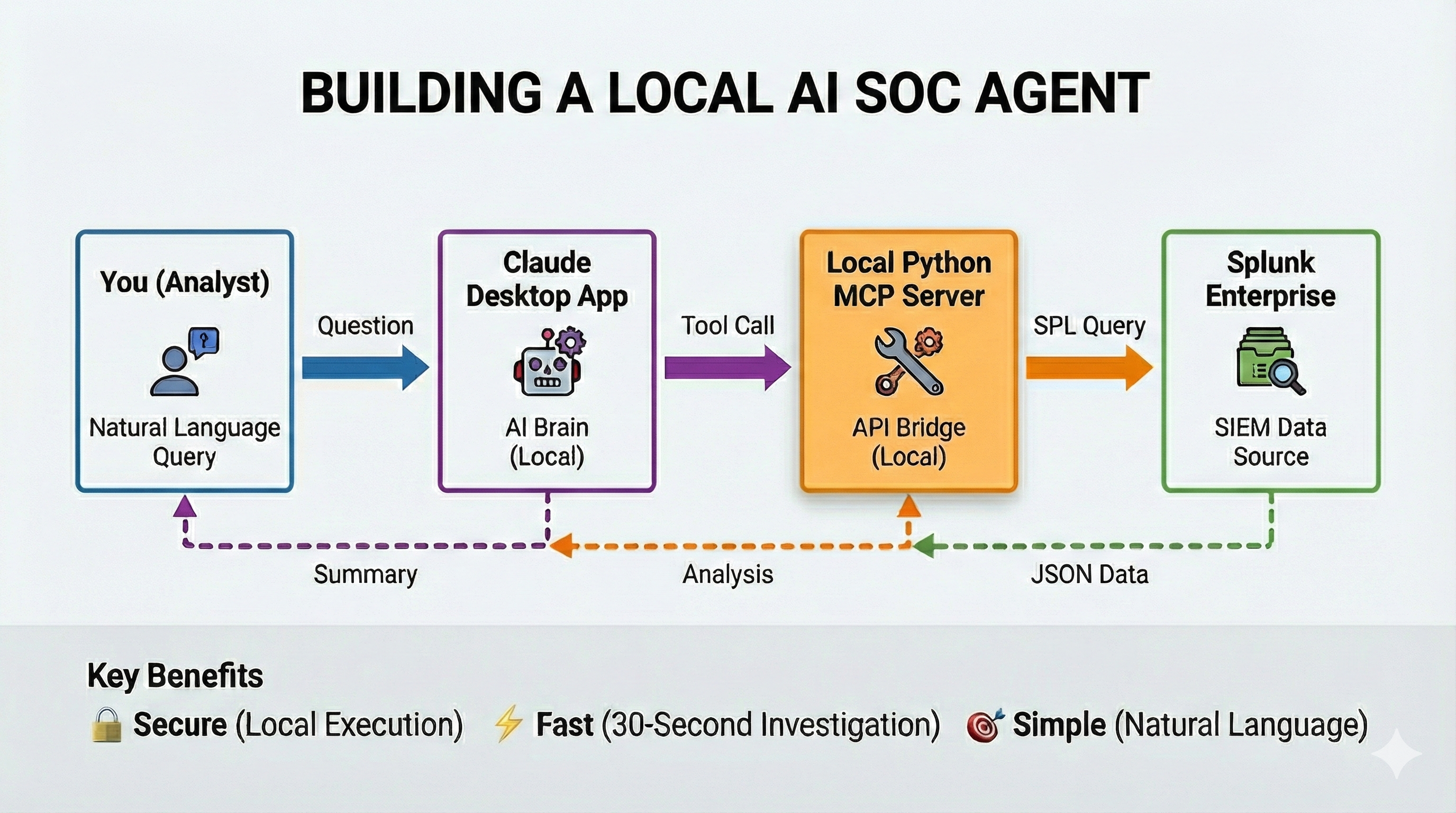
I engineered a Local Model Context Protocol (MCP) Server that acts as a secure bridge between Claude Desktop and Splunk Enterprise.
Instead of moving data to the AI, this tool brings the AI to the data. It allows the LLM to:
- Write SPL on behalf of the analyst
- Execute queries securely via the local API
- Analyze results in real-time without uploading full datasets to the cloud
High-Level Architecture
The secure data flow showing how the Local MCP Server acts as a bridge, translating natural language prompts (from Claude) into executable SPL queries (for Splunk). Raw log data remains within the local network boundary.
Installation and Setup
Prerequisites
- Python 3.10+ installed
- Splunk Enterprise (Local or Remote instance)
- Claude Desktop App installed
- uv package manager (recommended)
1. Clone the Repository
git clone https://github.com/chalithah/splunk-claude-mcp-agent.git
cd splunk-claude-mcp-agent
2. Install Dependencies
pip install -r requirements.txt
3. Configure the Bridge
Modify your Claude Desktop configuration file to register the local Python server as a tool.
Windows: %APPDATA%\Claude\claude_desktop_config.json
Mac: ~/Library/Application Support/Claude/claude_desktop_config.json
{
  "mcpServers": {
    "splunk": {
      "command": "uv",
      "env": {
        "SPLUNK_HOST": "192.168.195.129",
        "SPLUNK_PORT": "8089",
        "SPLUNK_USERNAME": "your_username",
        "SPLUNK_PASSWORD": "your_password",
        "SPLUNK_SCHEME": "https",
        "VERIFY_SSL": "false"
      },
      "args": [
        "--directory",
        "C:\\path\\to\\splunk-claude-mcp-agent",
        "run",
        "python",
        "splunk_mcp.py",
        "stdio"
      ]
    }
  }
}
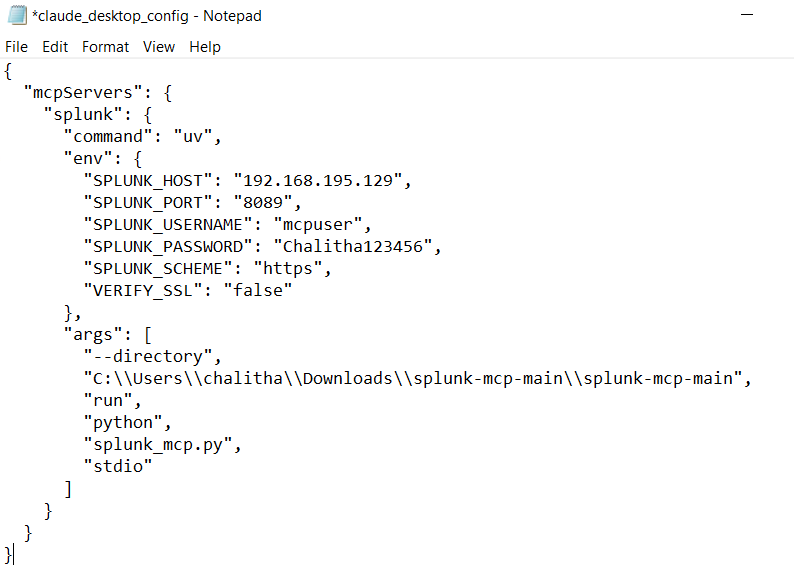
Configuring the JSON bridge between the LLM and the local Splunk server.
4. Verify Connection
- Restart Claude Desktop
- Navigate to Settings > Developer > Local MCP Servers
- Confirm "splunk" shows status "running"
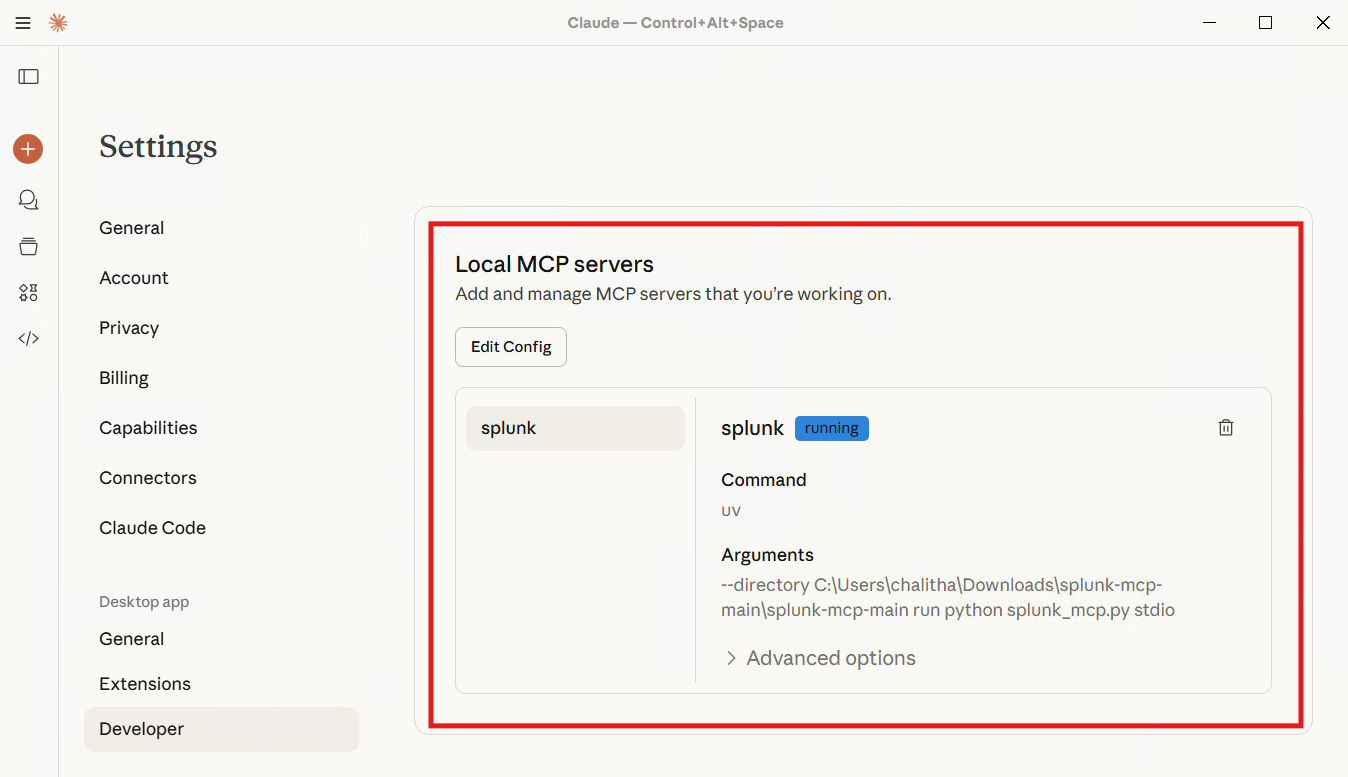
Verifying the local MCP server is running and connected to the LLM.
Usage: Red Team vs. AI Analyst
To validate the agent's capabilities, I simulated a real-world Credential Dumping (Mimikatz) attack.
Step 1: The Attack (Red Team Simulation)
Using Atomic Red Team, I executed the Mimikatz payload (MITRE T1003) on a Windows 10 endpoint to dump memory and extract plaintext passwords.
Invoke-AtomicTest T1059.001
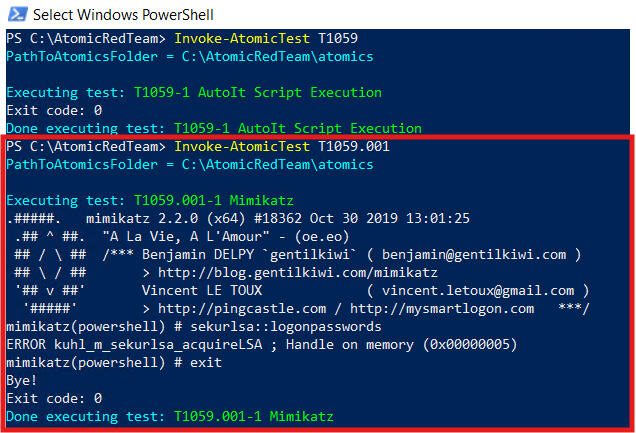
Executing the Mimikatz payload on the target endpoint.
Step 2: The AI Investigation
Instead of writing SPL to hunt for Event Code 4625 or 4104, I simply asked Claude a natural language question:
"Were there any suspicious activity that happened on 11/23/2025 1AM to 10AM under the index of 'index=mydfir-project'?"
The AI recognized the intent, routed the query to the local Python server, and returned the analysis instantly.
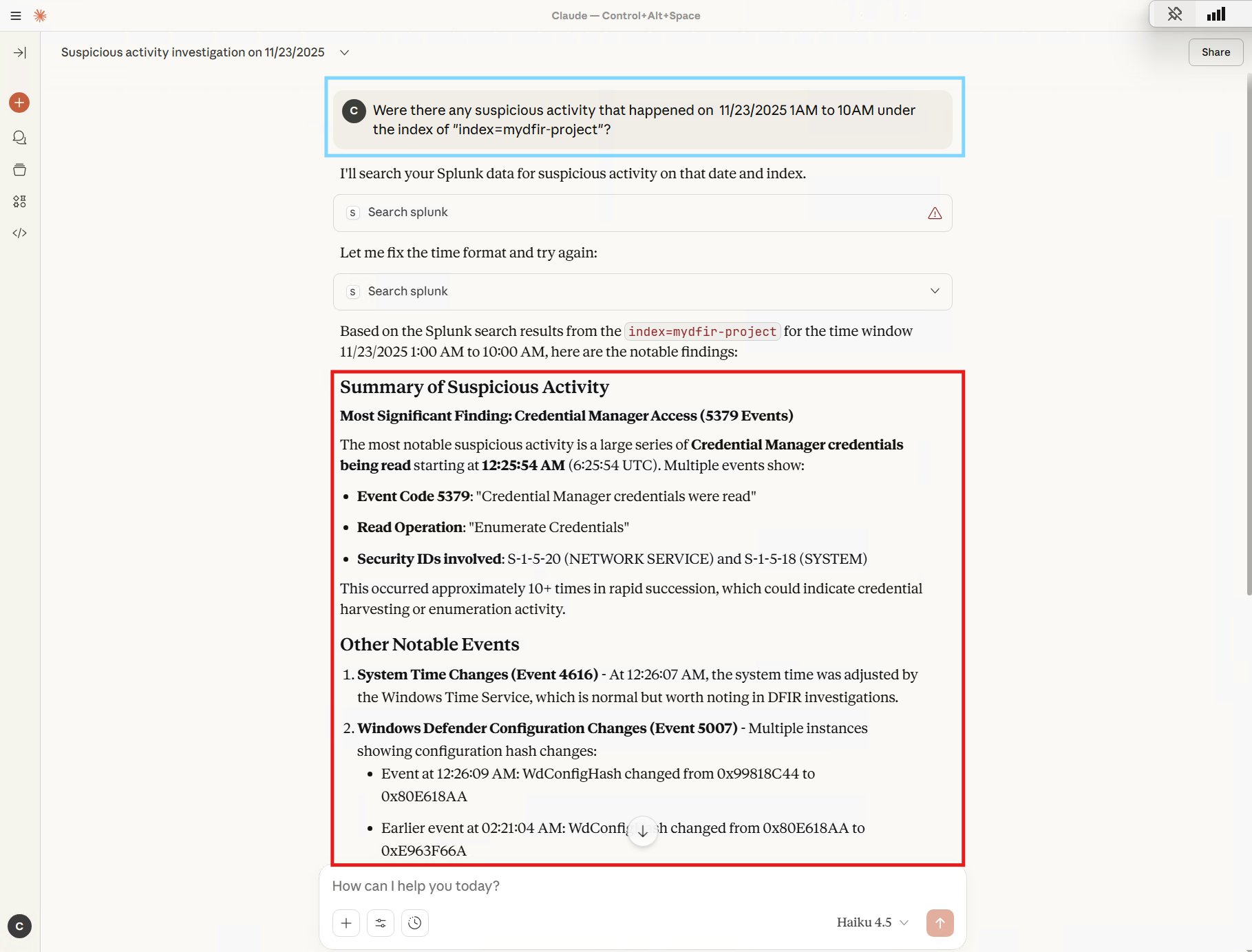
The AI Analyst independently queries Splunk and identifies security evasion techniques.
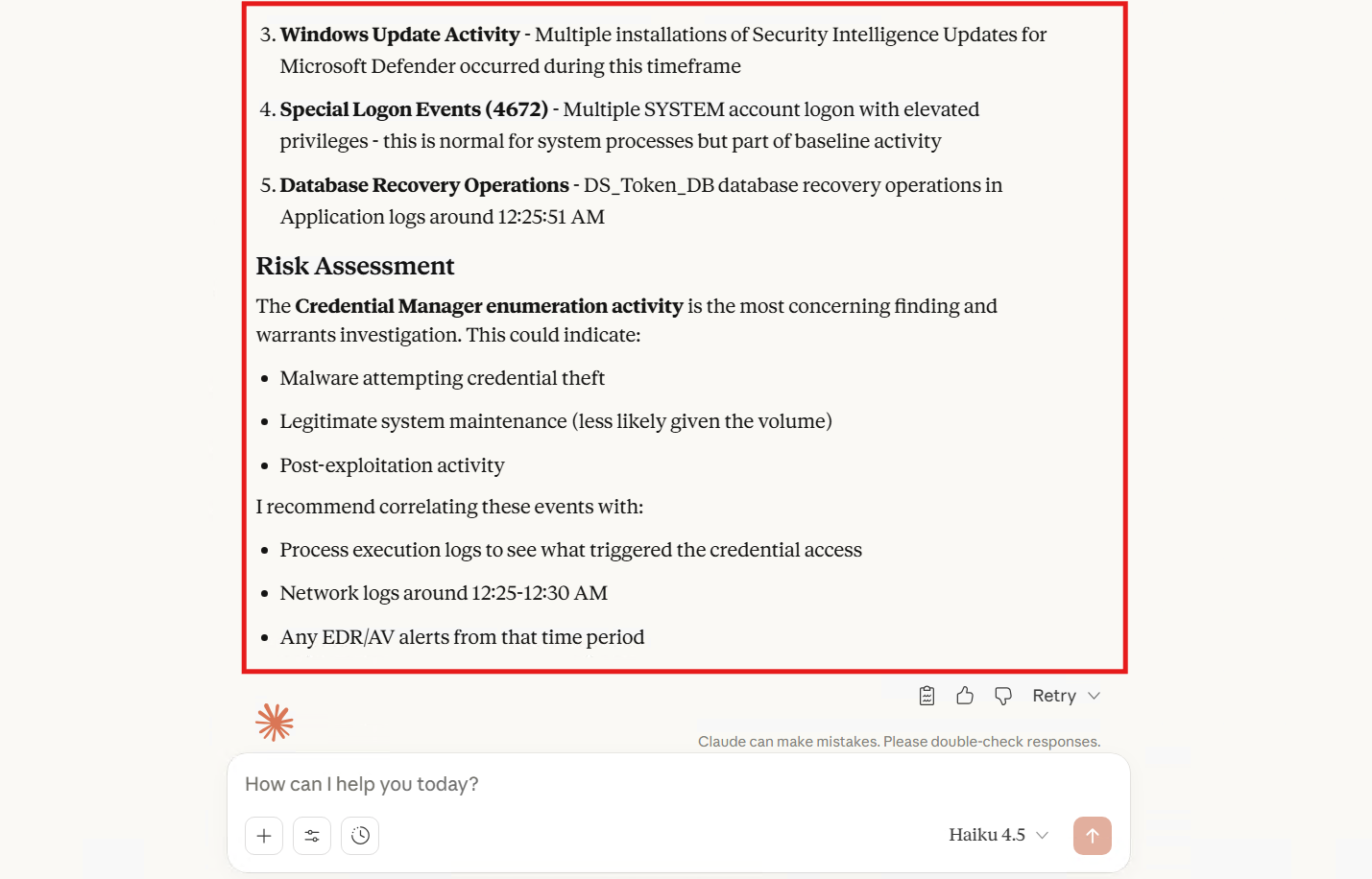
Risk assessment and recommended investigation steps.
Analysis Results
The Agent successfully identified high-risk behaviors without human intervention:
| Finding | Description |
|---|---|
| Identified Evasion | Flagged Windows Defender Configuration Changes (Event 5007) |
| Detected Harvesting | Caught Mass Credential Manager Access (Event 5379) |
| Contextualized | Summarized disparate logs into a readable narrative |
Available MCP Functions
| Function | Description |
|---|---|
search_splunk | Execute SPL queries against Splunk and return results |
list_indexes | List all available Splunk indexes |
get_saved_searches | Retrieve configured Splunk alerts and saved searches |
Sample Queries
"List all available Splunk indexes"

"Show me failed login attempts in the last 24 hours"

"Find any PowerShell execution events containing 'mimikatz'"

"Were there any suspicious activities yesterday between 9AM and 5PM?"

"Check for Windows Defender configuration changes this week"
Why This Matters for Enterprise Security
This project solves three critical business problems:
| Problem | Solution |
|---|---|
| Security and Privacy | By running the MCP server locally, you control the gateway. Full databases are never uploaded to the cloud—only the specific query results needed for analysis. |
| Lowering the Barrier | Junior analysts can investigate complex threats using natural language, learning valid SPL syntax as they watch the AI work. |
| Speed (MTTR) | It turns a multi-tab investigation into a 30-second conversation. |
Project Structure
splunk-claude-mcp-agent/
├── splunk_mcp.py              # Main MCP server script
├── README.md                  # This file
├── LICENSE                    # MIT License
└── images/
    ├── local-ai-soc-agent.png
    ├── claude-config-JSON.png
    ├── mcp-server-status.png
    ├── attacker-mimikatz-execution.png
    ├── claude-analysis.png
    └── claude-analysis2.png
Security Considerations
- Local Execution: The MCP server runs entirely on your machine
- Network Boundary: Raw log data never leaves your local network
- Credential Management: Use environment variables or
.envfiles, never hardcode credentials - Minimum Permissions: Create a dedicated Splunk user with read-only access for the MCP agent
Related Projects
- End-to-End SOC Automation Lab - Full SOC pipeline with n8n, DFIR-IRIS, Slack integration, and threat intelligence enrichment
Resources
Collected info
- ★ 7 stars
- ⎇ 1 forks
- Language: Python
- Source updated: 9/2/2026