
Helix
Helix: AI-powered CLI with RAG intelligence that converts natural language to commands using 450+ system commands. Features local AI, cross-platform package management, Git workflows, syntax highlighting, and multi-layer safety with directory sandboxing.
Links
README
From the repo.
Helix 🤖
An Intelligent, AI‑Powered CLI Assistant, Red-Team Platform, and Native Shell
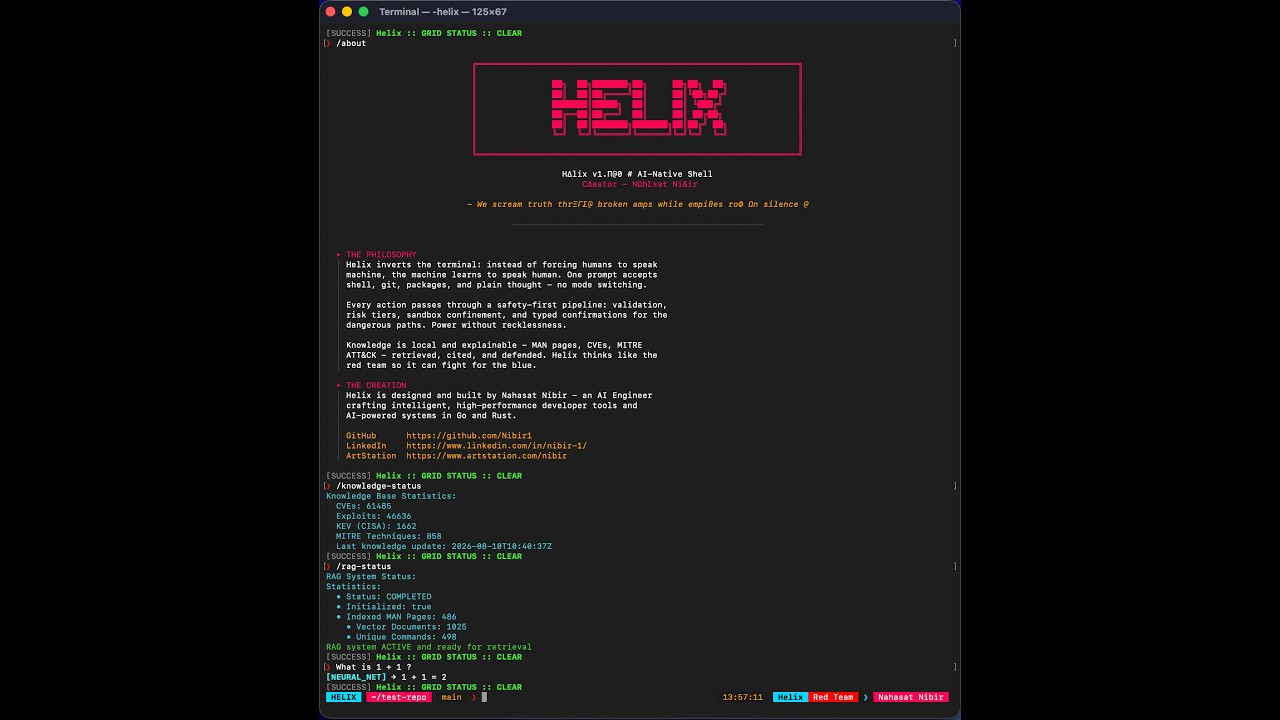
📺 Watch the full end-to-end demo featuring core functionalities.




Helix is an AI-powered command‑line assistant and adversarial cybersecurity platform that turns natural language into safe, executable actions. It bridges the gap between human intent and machine execution, combining local LLM inference, retrieval-augmented generation (RAG), live threat intelligence, and strict safety pipelines.
It combines:
- A voice-first companion (
/blackbox on) — microphone open, camera on, replies spoken, and an ambient loop that looks at the scene and speaks up on its own. Say "manual mode" to return to the keyboard - Multi-Provider AI (OpenAI, Anthropic, Google Gemini, Meta, DeepSeek, Ollama and more) — no model IDs compiled in; the model is discovered from the provider and ranked vision-first
- Live Threat Intelligence (NVD, CISA KEV, Exploit-DB, MITRE ATT&CK)
- RAG over System Docs (900+ indexed MAN pages and CLI tools)
- One visual language across all 57 commands — panels, badges and aligned rows, never a flat stack of coloured lines. Colour honours
NO_COLORand switches itself off when the output is not a terminal, so piping Helix or running it as a service produces clean text - A Multi-Layer Safety & Sandbox Engine around shell, git, packages, and recon
- Enterprise-Grade Hardening (Kernel confinement, instruction firewalls, and signed supply chains)
- Synthetic Tonal Audio for immersive, synchronized terminal feedback
- Self-updating —
/rebootverifies, installs and restarts into a new release, resuming the same mode, directory, provider and conversation
It’s built as a portfolio‑grade, enterprise-hardened systems project in Go, demonstrating real‑world skills in AI integration, sandboxed execution, strict JSON planner protocols, memory-only stealth execution, live threat intelligence pipelines, and verifiable supply-chain security.
Quick Start & Installation
Option 1: Automated Installer (macOS / Linux)
The fastest way to get Helix running. This one-liner clones the repository, builds the optimized binary, initializes your ~/.helix configuration directories, and prompts you to set Helix as your default system shell.
git clone https://github.com/Nibir1/Helix.git && cd Helix && ./scripts/install.sh
Option 2: Windows (PowerShell)
Open PowerShell as Administrator and run the automated Windows setup script. This will build the binary, add it to your system PATH, and optionally bootstrap Ollama.
git clone https://github.com/Nibir1/Helix.git; cd Helix; .\scripts\install.ps1
Installs to C:\Program Files\Helix and puts it on the machine PATH, so
helix works from cmd, PowerShell and Windows Terminal. It needs elevation for
both of those.
Option 2b: Windows under MSYS2 / MINGW64 / Git Bash
make install works from a POSIX shell on Windows and needs no administrator
rights. It installs into that environment's /usr/local/bin under the name
helix.exe and skips the /etc/shells and chsh steps, which have no meaning
there.
make install
The trade-off is reach: the binary is on PATH inside that shell only. The
installer prints the Windows path at the end so you can add the folder to your
Windows PATH, or run install.ps1 for a system-wide install instead. Point
it somewhere else with HELIX_INSTALL_DIR=/some/dir make install.
Windows prerequisites for voice. ffmpeg (microphone capture) and, for
gpt-live-1 only, libopus:
pacman -S mingw-w64-x86_64-ffmpeg mingw-w64-x86_64-opus
Helix names the missing library and this command if it starts a live session without it. Microphone selection is automatic — see Picking a microphone on Windows.
Option 3: Go Install (Cross-Platform)
If you already have Go 1.25+ installed and just want the binary in your $GOPATH/bin:
git clone https://github.com/Nibir1/Helix.git && cd Helix && go install ./cmd/helix
go install github.com/Nibir1/Helix/cmd/helix@latestdoes not work. The module is declared ashelixrather than as its repository path, so the Go toolchain refuses it with "module declares its path as: helix". Clone first, as above, or use the prebuilt binaries in Option 4.
Option 4: Pre-compiled Binaries (No Build Required)
Don't want to build from source? Download the latest pre-compiled binary, checksums, and archives for your OS directly from the Releases Page. All official releases are cryptographically signed and include a Software Bill of Materials (SBOM). (See "Verifying Releases" below).
Removing Helix
make uninstall
Or, from anywhere, using the installed binary — no checkout required:
helix uninstall
Either one prints a manifest of exactly what it will remove and asks before
it touches anything: the binary and any .prev left behind by /reboot, the
/etc/shells registration, the launchd or systemd background service, and
~/.helix with everything in it. It asks for sudo once, up front, only if
something is root-owned.
If Helix is your login shell it is set back first, to the shell the
installer recorded in ~/.helix/shell_pref, and if that step fails the binary
is deliberately kept — the two failures together are a machine that cannot
open a terminal.
Ollama, sox and ffmpeg are left alone. Helix may have suggested
installing them; it does not own them, and you may be using them for something
else.
Picking a microphone on Windows
DirectShow addresses a microphone by its literal friendly name — there is no
default — so Helix asks ffmpeg what exists and uses the first audio device it
reports. You can see the same list yourself:
ffmpeg -list_devices true -f dshow -i dummy
To choose a different one, set HELIX_AUDIO_DEVICE to the full -i argument:
set HELIX_AUDIO_DEVICE=audio=Microphone (2- USB Audio Device)
The same variable overrides the device on macOS (:0, an avfoundation index)
and Linux (default, a PulseAudio sink). If a recording fails on Windows,
Helix prints the devices ffmpeg could see alongside the error, because
exit status 0xffffffff on its own says nothing.
Inside a running session, /purge offers the same thing as a separate, third
confirmation after it has wiped your data — so a data wipe never takes the shell
away by surprise. Say no and you keep Helix with a clean slate; say yes and
nothing is left.
⚡ Accelerating Threat Intel: NVD API Key
Helix operates on a local-first architecture, downloading and indexing the National Vulnerability Database (NVD), CISA KEV, Exploit-DB, and MITRE ATT&CK directly into your local SQLite knowledge base. This allows /vuln and /explain queries to run instantly with full context, even when completely offline.
However, the NVD enforces strict rate limits on unauthenticated API requests to prevent server overload.
| Configuration | Initial Sync Time (119-day window) | Subsequent Syncs |
|---|---|---|
| Without API Key | 25 - 40 minutes (6.5s delay per page) | ~10 seconds |
| With API Key | 10 - 15 minutes (1.0s delay per page) | ~2 seconds |
While the initial sync runs silently in the background on first boot, providing an API key dramatically accelerates the hydration of your local threat intelligence database.
1. Request a Free API Key
- Navigate to the NVD API Key Request Page.
- Enter your email address and complete the captcha.
- Check your inbox and click the activation link to reveal your API key.
2. Configure Helix
To make the API key permanently available to Helix, add it to your shell's environment variables.
For Zsh (macOS default):
echo 'export NVD_API_KEY="your-actual-api-key-here"' >> ~/.zshrc
source ~/.zshrc
For Bash (Linux default):
echo 'export NVD_API_KEY="your-actual-api-key-here"' >> ~/.bashrc
source ~/.bashrc
3. Verify Acceleration
Launch Helix and execute the knowledge update command:
/knowledge-update
The live TrueColor progress bar will now reflect the accelerated sync speed, bypassing the 6.5-second rate limit and fully indexing ~290,000 CVEs in a fraction of the time.
Manual Build (For Developers)
If you prefer to build and run Helix locally without installing it globally:
git clone https://github.com/Nibir1/Helix.git
cd Helix
make current   # Builds the optimized binary
./dist/helix   # Launches Helix
make current builds CGO-free, which is the same way CI builds and the same way every
released artifact is built (.goreleaser.yml), so the binary you compile here is built like
the one you would download. It also means a local build needs no working system C linker.
Building needs Go 1.25+ (the badge above, and go.mod). If you intend to run the fuzz
targets, use Go 1.27+ — see the note under
Enterprise Hardening. make info lists every
target with what it does, and make release-check runs everything a release checks while
tagging nothing.
The "Helix Inversion": One Prompt to Rule Them All
Helix inverts the traditional terminal paradigm. Instead of forcing humans to speak machine, the machine learns to speak human.
Using an advanced Input Classification Engine (internal/shell/classify.go), Helix analyzes every line you type and dynamically routes it:
- Type
ls -laorgit status→ Helix recognizes shell structure and executes it safely. - Type
why is my build failing?→ Helix routes it to the AI Planner. - Type
/vuln CVE-2024-1234→ Helix queries the local threat intelligence database.
No mode switching. No prefixes required. Just type.
What Helix Can Do
1. Shell Automation & System Administration
find all .go files modified in the last 24 hourslist all large files in this directory and delete the logscompress the src folder and move it to backup
The session persists the things a shell session should. cd has always
moved Helix itself rather than a child process; export FOO=bar and
unset FOO now do the same, so a later command inherits them:
export PATH="$HOME/go/bin:$PATH"
make dev            # sees it
Previously every command ran in a fresh child, so an export set a variable in
a process that immediately exited — while cd persisted, which made the
difference invisible and the failure baffling. The value is evaluated by your
real shell, so quotes, $VAR, ~ and $(...) all behave normally. Anything
that is not purely an assignment — a prefix like FOO=bar make dev, or
export A=1; rm -rf ~ — runs exactly as before. Spoken exports run but do not
persist, and say so: an exported PATH silently redirects every command that
follows, which ADR-005 reserves for the keyboard.
2. Git Workflows (Safe & Dangerous)
increase the version in the README to 1.1.0, then stage, commit, and tag v1.1.0undo the last commit but keep the changesforce push my changes to origin main(Requires typed confirmation: "YES, FORCE PUSH")
3. Package Management
install dockerupdate node to the latest versionuninstall python2(Blocks critical system package removal)
4. Defensive Threat Intelligence & Reconnaissance
/vuln CVE-2021-44228(Fetches CVSS, KEV status, and patch guidance)/explain "git merge --squash feature-branch"(AI-powered defensive analysis with MITRE context)/scan authorize 192.168.1.10 --reason "Internal pentest scope"/scan 192.168.1.10(Runs nmap/masscan through the authorized recon engine)
5. Enterprise Security & Privacy
/sandbox strict(Enforces kernel-grade write confinement via Landlock/Seatbelt)/doctor(Surfaces local, telemetry-free crash diagnostics and system health)/reboot(Self-updates from GitHub releases or a local build — checksum-verified, atomically installed, automatically rolled back if the new binary cannot start — then restarts and resumes what it was doing)/purge(Deletes all local Helix data — keys, databases, caches, transcripts and crash reports — after a grouped manifest and an explicit confirmation)
Comprehensive Command Reference
Helix exposes a rich set of slash commands for system control, the agentic harness, intelligence gathering, and UX tuning. Every command below is defined in one registry (cmd/helix/registry_tables.go), which is also what /help, Tab completion, and the did-you-mean suggester read — so the menu cannot drift from the code.
At the prompt: Tab completes a slash command (or a path), /help <command> prints one command's full detail, and a mistyped command suggests the closest matches. /help on its own is an index of command names — argument syntax lives in the detail screen, which has the whole width for it.
Core & Navigation
| Command | Description |
|---|---|
/help [command] | Show this menu, or full detail for one command |
/about | Helix philosophy, banner & creator |
/version | Version, build flavor, and platform |
/setup | Unified setup wizard (identity, AI provider) |
/config [key [value]] | Show or change persisted settings |
/cd [dir] | Change directory (sandbox-aware) |
/status | Session state: RAG, provider, harness, sandbox, hooks |
/doctor | Full system diagnostics, including edge and sidecar checks |
/online | Check internet connectivity |
/debug <on|off> | Toggle verbose debug logging |
Session & Context
| Command | Description |
|---|---|
/context | What the model is being told, and how big it is |
/cost | Model traffic for this session, by purpose |
/memory [show|clear] | Show or wipe conversation memory |
/clear | Archive and clear the conversation, then clear the screen |
/compact [focus] | Summarize the conversation into one dense turn |
/resume [id] | List archived conversations, or reload one |
/export [path] | Write the conversation to a Markdown transcript |
/history [pattern] | Search this machine's Helix command history |
Nothing here destroys a transcript. /clear, /compact, /memory clear, and /resume all archive the conversation to ~/.helix/sessions/ (0600) before replacing it, and /resume lists the archive.
/cost and /context report estimated token counts (~4 characters per token). No provider in the registry returns a usage block on the streaming path Helix uses, so an exact count is not available to report — call counts, failures, byte counts, and latency are exact. Helix ships no price table: rates change without notice, and a stale hardcoded rate is worse than an honest token count.
Agentic Harness
| Command | Description |
|---|---|
/agentic [on|off|steps <n>] | Iterative harness: observe step results and self-correct |
/plan <request> | Show the plan for a request without executing anything |
/permissions [mode] | Approval posture: plan, cautious, ask, or auto |
/todo [add|start|done|rm|...] | Task list the planner can see and edit |
/tools | The harness tool vocabulary and each tool's gate |
/hooks [list|add|rm|test|...] | Run your own commands around tool execution |
/undo | Reverse the most recent journalled action |
/dry-run | Toggle command execution preview mode |
The planner reaches files through a file tool — read, list, glob, grep,
edit, write — rather than shelling out to cat and sed. edit replaces an
exact snippet and fails when the snippet is absent or ambiguous, where an
in-place sed that matches nothing exits 0 and reports success. Every path goes
through the same sandbox check a shell command gets; edit and write are
medium risk, so the default posture asks first.
/todo has two authors. The agent can add work it discovered is needed, rewrite
a task that is wrong in detail, and supersede one that should not happen — each
with a reason, each announced on screen. It can delete only its own: a task you
wrote can be set aside but never erased, and a rewrite keeps your original
wording. See docs/harness.md §4.
Approval posture (/permissions) layers on top of the risk tiers and never replaces them:
| Mode | Behavior |
|---|---|
plan | Nothing executes. Steps are printed as a plan with their risk tier. |
cautious | Every command asks first, including low risk. |
ask | Default: low runs, medium asks, high is blocked. |
auto | Medium risk is auto-approved. |
High-risk commands stay blocked in every mode, typed confirmations stay typed, the sandbox still validates every command, and the Voice Risk Policy still caps anything arriving by voice. The mode can only change the question Helix asks about commands it was already willing to consider.
Hooks (/hooks) run your own commands around tool execution — the escape hatch for policy Helix cannot know about ("never touch the prod kubeconfig", "gofmt after any write", "log every push"). See docs/harness.md for the security model; in short: hooks come only from ~/.helix/hooks.json, they run after every built-in gate, and a blocking pre-hook can subtract permission but never grant it.
Code & Repository
| Command | Description |
|---|---|
/init [--force] | Study this repository and write HELIX.md project context |
/diff [--staged] [path...] | Show the working tree diff with a summary |
/review [--staged] [path...] | AI review of the current diff |
/commit [message] | Commit staged work, writing the message from the diff |
/git <request> | Natural-language git operations with safety gates |
/web <query|url> | Guarded web search or page fetch |
/explain <command|technique> | Defensive analysis: techniques, detections, mitigations |
/init writes a HELIX.md that Helix then loads on every turn in that directory tree (AGENTS.md and CLAUDE.md are recognized too). Like retrieved knowledge and conversation memory, it is injected as a zero-authority fenced block: it can inform the planner and can never command it.
/commit never stages anything for you — what you staged is what gets committed.
AI & Providers
Local runtimes — Ollama, llama.cpp, whisper.cpp, Piper — have their own guide: docs/local_runtimes.md. Ollama is the local default; llama.cpp is registered and selectable with /provider use llamacpp but is not offered in the first-run menu, since it needs a hand-managed server. It covers which to use, how llama.cpp serves models Ollama already pulled, the llama.cpp/whisper.cpp port collision on 8080, and what the local-gguf placeholder was doing wrong.
| Command | Description |
|---|---|
/provider [status|list|use <name>|<name>] | Switch or inspect the AI provider |
/provider-status | Provider health, keys, failover state, planner transport — and whether the selected model is still in the provider's catalogue |
/model [list|use <id>|<id>] | Switch or list models — numbered, capability-tagged, ranked vision-and-fast first; answer with a number or any exact ID |
/models | List models the active provider offers |
/test-basic-ai | Smoke test the active AI model |
RAG & Knowledge Base
| Command | Description |
|---|---|
/rag-status | RAG indexing progress and vector stats |
/rag-reindex | Trigger a background RAG reindex |
/rag-rebuild | Force a full RAG knowledge base rebuild |
/rag-reset | Wipe all RAG vector data |
/knowledge-update | Fetch latest CVEs, CISA KEV, exploits, MITRE ATT&CK |
/knowledge-status | Knowledge database row counts and last update |
/knowledge-reindex | Rebuild the FTS5 search index |
Security, Recon & Stealth
| Command | Description |
|---|---|
/vuln <CVE|EDB|T-ID|query> | Defensive vulnerability intelligence lookup |
/scan [authorize|revoke|status] <target> | Reconnaissance against an authorized target |
/sandbox [off|current|strict] | Directory confinement for every executed command |
/stealth <on|off> | Private history mode (suppresses shell history) |
/crash [list|view <n>|clear] | Inspect and manage local crash diagnostics |
First run
The first boot walks three stages, each skippable: AI provider, system packages, then the speech chain. The package stage detects the host's package manager (brew, apt, dnf, pacman, zypper, apk, winget, choco) and offers to install what Helix needs — sox for the microphone, ffmpeg for the camera. Nothing installs without a separate yes, and the exact command is shown before it runs. Re-run any stage later with /setup.
The speech chain stage behaves differently on purpose. Choosing a chain there is the decision, so what that chain needs — a runtime, a model file, a server, even a missing host package like Python — is installed and started without asking again. First boot is where you decide what Helix may put on your machine; the voice wizard is where you have already decided.
A stage failing is survivable too. If a model download fails or a provider cannot be reached, Helix says what did not finish and starts anyway — you get a working shell with /doctor naming exactly what is missing, rather than being returned to your login prompt.
Where Helix does not know a verified package name for your platform, it says so and points at the docs rather than running a guess.
Live mode — /blackbox
/blackbox on is Helix awake: microphone open, camera on, replies spoken, and a companion loop that looks at the scene on its own and speaks up when something is worth saying. Say "manual mode" at any time to return to the keyboard, "turn off your eyes" to close the camera without ending the conversation, or "reboot" to restart the shell — which comes back listening, in the same directory, on the same provider, with the conversation intact.
Three listening states, and it starts in one of them. Helix is always in exactly one:
| microphone | keyboard | leaves by | |
|---|---|---|---|
| STANDBY (startup default) | wake detection only — nothing transcribed | live | any sound → AWAKE · "manual mode" → MANUAL |
| AWAKE | transcribing every turn, no re-waking in between | live | a stop phrase · /blackbox off · 10 min silence |
| MANUAL | closed | live | /blackbox wake on |
A fresh install starts in STANDBY: make any sound and a conversation begins, keep typing and nothing changes — the keyboard and the microphone at the same time, with nothing to activate. Nothing is transcribed while it waits; only the detector runs.
A wake opens a conversation, not a turn. Every turn used to need its own wake word, which made anything longer than one question exhausting. Now Helix keeps taking turns until you end it: a stop phrase, /blackbox off, or ten minutes with nothing said (awake_idle_stand_down_s, 0 disables it). The stand-down is the only exit that is not your decision, and it is the bound on an open transcribing microphone left running in an empty room.
The stop phrases differ in strength. "manual mode", "close the mic" and "blackbox off" spoken close the microphone and persist it. "you can turn off now", "go to sleep" and "stop listening" only end the conversation — the wake word stays live. "that's all" and "we're done" mean the same as the second group but always confirm first, because they are also how an ordinary request ends. Voice can reduce listening but never reopen it: coming back out of MANUAL is typed-only, enforced in the state transition itself.
Type while it listens. The keyboard is live during a capture, not only at an idle prompt. Start typing mid-turn and the capture is cancelled and the partial clip discarded without being transcribed — a killed recorder can return a fragment with no error, and half a sentence could come back as a stop phrase. awake_keyboard: false turns it off; Windows has no termios, so AWAKE is voice-only there.
Upgrading? A config written by a build before 2026-09-09 holds an "enabled": false that the old plain-bool save wrote on its own, and an explicit false is never overridden — it is the documented opt-out — so type /blackbox wake on once. Under the three-state model that config now has a name: you start in MANUAL, with the microphone closed.
Honest limits: with the default engine any sound wakes it (loudness measured against the room's own noise floor, not words — the sidecar engine is the phrase-accurate option), a word spoken while you type is not seen until you submit the line, and the armed prompt is Unix-only. A fresh install with no microphone behaves exactly as before. See docs/blackbox.md §3.
A genuine fault (no recorder, a collapsed provider chain) is reported and offers you a typed turn without ending the conversation, so a dead microphone cannot strand you.
Eight commands (/voice, /manual, /voice-setup, /voice-status, /wake, /say, /tts, /eyes) folded into this one; typing an old name prints where it went.
Helix has a persona, not a default assistant register: it answers first, keeps replies short because most of them are read aloud, says "I ran it" about things it ran, and will tell you when it thinks you are about to do something unwise. The persona shapes tone only — every safety gate sits downstream of it.
No Docker required, anywhere — and, on Linux and Windows, no Python either. whisper.cpp is a native binary. Piper ships one too: Helix runs it as a persistent process with the voice model held resident, which is both interpreter-free and faster than the HTTP server it replaces (measured: ~55–66 ms per sentence once warm, against the server's 103 ms, because there is no HTTP hop and no model reload). Kokoro is the one optional component that ships as a container; Helix will not install a runtime for it, and marks it needs docker rather than walking you into a failed pull.
macOS is the exception, and it is upstream's. Piper's published macOS archives ship the debug bundle but none of the .dylib files they need, so the binary cannot start — verified by downloading and running it. On macOS Helix keeps the Python server (still 103 ms) and says why rather than fetching 19 MB that fails on first use. Its successor project publishes Python wheels only, so there is no newer standalone build to move to.
Sesame CSM-1B is the quality local voice: the speech model from Sesame's "uncanny valley" demo, run through a Rust sidecar with no Python and no Docker, and — uniquely among Helix's voices — conditioned on the last few turns of the conversation rather than synthesizing each sentence cold. Helix builds it for you: /blackbox setup detects the compute backend (CUDA if nvidia-smi answers, Metal on Apple Silicon, otherwise a tuned CPU build), installs git and cargo if the host lacks them, and compiles it — printing the evidence for its choice before it starts, because a detected backend you can see is not a choice made on your behalf. The one step left to you is accepting Sesame's licence, which needs your own account. It wants a discrete GPU (~8 GB VRAM); pair it with piper-local as the fallback so a machine that cannot keep up simply uses the fast voice. Context retention is opt-in, memory-only and bounded, and /blackbox status reports whether the sidecar is actually conditioning on it rather than assuming so — an unpatched server accepts the context field and silently discards it. See docs/local_runtimes.md §3.5.
See docs/voice.md for the spoken-command vocabulary, what voice deliberately cannot reach, and the honest limits.
On most chains capture is half-duplex: the mic is muted while Helix speaks, so you cannot talk over a reply. Ctrl+C stops one instantly, and /config barge-in on lets you stop it by speaking in the pause between sentences — the speaker is idle there, so no echo cancellation is needed. That is interruption at the pace of punctuation, not full duplex: a long sentence plays to its end.
gpt-live-1 is the exception and lifts all of that. Pick "Talk over it" in /blackbox setup and the microphone stays open for the whole conversation: you can cut in mid-sentence, and the model decides when your turn ended rather than a silence timer. It costs $0.05/min while open (plus your own planner) and needs libopus. Your own model still does every bit of the reasoning — gpt-live-1 only hears and speaks, which the THINKING row in the live banner states on every turn. Speakers are fine; the service cancels its own voice out of the microphone, measured at three volumes. See docs/voice.md §7c.
| Command | Description |
|---|---|
/blackbox [on|off|status|setup|look|eyes|wake|tts|say|log|stats] | Live mode — Helix listens, watches, answers, and speaks up |
/listen [seconds] | Record and transcribe one clip (max 60s) |
/mictest | 3s self-test: is the mic actually being heard? |
Subcommands:
- on / off — go live, or return to the keyboard
- status — one report: hearing, sight, wake, initiative, retained context, how a reply can be interrupted, and transcript logging, then the full speech chain
- setup — configure the STT/TTS providers with live pricing
- look [question] — capture one frame now and answer a question about it
- eyes
on|off— camera only, without entering or leaving live mode - wake
on|off— on by default.onis STANDBY: the microphone is held open at an idle prompt, scoring chunks for a wake and transcribing nothing. Talking is enough; typing is always still there.offis MANUAL: the microphone is closed and stays closed until a typed command reopens it. (The default detector wakes on any speech measured against the room's own noise floor; true phrase spotting needs a sidecar."always_listen": falseun-arms the idle prompt without closing the mic. Upgrading from a build before 2026-09-09? Your config has an"enabled": falsewritten by the old plain-bool save, and the new default does not override an explicitfalse— so you start in MANUAL; type/blackbox wake ononce.) - tts
on|off— whether ordinary replies are spoken aloud - say text — speak text through the TTS chain
- log
on|off|status|show— keep a local text record of what was heard and said - stats — measured latencies and wake rate, judged against the §10 targets
Nothing you say is stored unless you ask for it. /blackbox log on starts a
transcript log at ~/.helix/voice_log/ (0600, rotated, wiped by /purge); with
it off there is no directory and no file. It records text only — transcripts,
replies, the STT provider and its confidence — never audio, because captured
clips are deleted the moment they are read. Voice can always stop the log and
never start it: turning recording on has to be typed.
That rule — voice may reduce what is collected but never increase it — is why a
spoken /reboot writes no conversation content at all. A typed one leaves a
240-character excerpt of your last message in ~/.helix/reboot.json so the
restarted shell can say what it was doing; a spoken one carries the mode, the
directory, the provider and your open tasks and stops there. Either way the
record is 0600, deleted the moment it is read, ignored if it is more than 12
hours old, and wiped by /purge.
Utilities
| Command | Description |
|---|---|
/audio <on|off> | Toggle tonal audio feedback |
/typewrite-all <on|off> | Typewriter effect for ALL output, not just AI replies |
DANGER ZONE
| Command | Description |
|---|---|
/reboot [now|check] | Self-update and restart. Checks GitHub releases and locally built binaries, installs automatically, and comes back in the same mode, directory, provider and conversation. A download is installed only if its SHA-256 matches the release's checksums file; the previous binary is kept and restored automatically if the new one cannot start. now skips the check, check only reports. Say "reboot" in live mode |
/purge | Wipe ALL Helix data (keys, DBs, caches, tasks, hooks, archives) for a fresh start. Shows a grouped manifest of exactly what exists and what each group costs you, then asks separately about large downloads (LLM weights, whisper models, piper voices, the piper runtime binary, the CSM source and build tree, Ollama's model blobs, and the CSM weights in the Hugging Face cache) with their sizes. The last two live outside ~/.helix and are shared with anything else on the machine that uses them, so the manifest says so before you answer, and closes by pointing at /reboot — open database handles only release when the process exits |
Aliases
/? /h /sos → /help · /v → /version · /reset → /clear · /usage → /cost · /mode → /permissions · /intel → /vuln
AI & Planner System
Helix uses a full agent-style planner that outputs strict JSON.
Unified Planner Intent System
The planner always returns a JSON Plan:
{
  "intent": "chat" | "shell" | "git" | "package" | "multi_step",
  "steps": [
    {
      "tool": "response" | "shell" | "git" | "package" | "recon" | "web" | "vision" | "file" | "todo",
      "message": "...",
      "command": "...",
      "action": "...",
      "args": { "key": "value" }
    }
  ]
}
Ultra‑Strict Planner Prompt
The planner is guided by a very strict system prompt (internal/ai/planner.go) that enforces:
- JSON‑only output (no markdown, no backticks, no commentary).
- First character must be
{, last character must be}. - No trailing commas, no partial fields, no truncated objects.
- Strong rules about which tools are allowed, which git actions are safe vs dangerous, and which commands are forbidden at the shell level.
Robust Plan Parsing
ParsePlanFromModelOutput includes:
- JSON extraction that strips accidental ``` fences if they sneak in.
- A tolerant
rawPlantype withmap[string]interface{}forargs. - A safe conversion layer: Arrays like
["README.md"]are normalized to"README.md". - A
fixPlanpass that normalizes intent names, mapsupgrade→updatefor packages, and collapses noisy arg keys. - A
validatePlanpass that drops malformed steps, enforces allowed actions per tool, and strips illegal fields.
If the planner ever returns junk, Helix will drop invalid steps or fall back to a plain chat response.
Shell Safety Subsystem (Multi‑Layer)
Arbitrary shell execution is heavily guarded by a 5-stage pipeline in internal/commands/safety/ and internal/confinement/.
1. ValidateAndCleanCommand
Every shell step flows through ValidateAndCleanShellCommand:
- Unicode hazard detection: Blocks zero-width characters, bidi-spoofing, and control characters.
- Quick unmatched quote detection with auto‑fix attempt.
- Strict balanced quote & brace validation.
- Extra high‑level rules: Blocks
curl ... | sh,wget ... | bash,eval, andmkfs. - Raw block devices: Blocks redirection onto a disk itself —
> /dev/sda,>> /dev/nvme0n1, and thehd*/vd*/disk*/rdisk*families — whatever the spacing. Reading a device, and writing to/dev/null, are untouched. - Light path sanity checks: Catches
rm -rf /and parent directory traversals (..) combined with write operators.
2. Risk Classification (Low / Medium / High)
AnalyzeShellRisk classifies commands:
- Low – harmless, read‑only (e.g.
ls,cat). Executes directly. - Medium – file‑modifying (e.g.
sed -i,chmod,chown, and any redirection that writes). Shows reasons and asks:Execute anyway? [y/N]. Spacing is irrelevant —echo x > f,echo x >fandcat a 2>err.logare all Medium, while2>&1writes no file and stays Low. - High – catastrophic patterns (e.g.
rm -rf, pipe‑into‑shell). Hard-blocked.
Those two lines describe a fix, not a design: until 2026-09-08 the Medium tier tested for
" > "with a space on each side, soecho x >f— the same command, one space apart — was Low, the tier that runs without asking. The device-write hard block had a mis-escaped pattern and had never matched anything. Both are now asserted by behaviour, and the details are in docs/SECURITY.md §1.
3. Directory Sandbox (Advisory)
All shell commands execute via a DirectorySandbox:
- Prevents traversal outside the allowed root.
- Resolves symlinks and handles case-insensitivity (macOS/Windows).
- Allows READ-ONLY absolute paths anywhere, but MODIFY/WRITE actions are blocked outside the sandbox.
4. Kernel-Grade Confinement (/sandbox strict)
When strict mode is enabled, write/delete operations outside the jail root are denied by the OS kernel, not by string matching:
- macOS: Seatbelt (
sandbox-exec) profile enforcement. - Linux: bubblewrap namespaces (preferred) or the Landlock LSM via pure-Go, CGO-free raw syscalls using a
--confined-childre-exec architecture. - Unsupported platforms: Graceful advisory fallback with a visible warning.
Threat Intelligence & RAG Pipeline
Helix maintains a local SQLite + FTS5 + Vector database updated with live threat feeds (internal/rag/).
- NVD CVEs: Rolling 120-day window with checkpointing, rate-limit handle, and browser-spoofing.
- CISA KEV: Known Exploited Vulnerabilities catalog.
- Exploit-DB: Sanitized exploit references for defensive validation.
- MITRE ATT&CK: Technique mappings for detection engineering.
- MAN Pages: Background indexing of 900+ system commands using 6 parallel workers.
- First-Run Bootstrap:
KnowledgeBootstrapruns silently in the background on first boot to populate the DB without blocking the CLI.
Instruction Firewall (Prompt-Injection Hardening)
Retrieved knowledge is treated as untrusted data with zero authority. The RAG pipeline is defended by five layered controls:
- Structured-fields-only context: Raw text never reaches the planner; only sanitized structured fields wrapped in
authority="data-only"fences. - Sanitization: Invisible/bidi Unicode, markdown fences, and imperative injection patterns ("ignore previous instructions") are stripped.
- Canary Honeypot: A per-request random token is embedded in the context; if the model echoes it, execution aborts with an injection alert.
- Critic Pass: A fail-closed, low-temperature JSON call validates the proposed shell plan against the user request alone.
- Provenance Escalation: Plan commands carrying tokens sourced from retrieved context (but absent from user input) are forced to Medium risk (mandatory confirmation).
Git Assistant (Safe + Dangerous Flows)
Helix has a dedicated GitManager with two faces: /git mode (natural language) and Agent mode (structured JSON actions).
Safe Git Planner Actions
commit,tag,add,checkout,create-branch.- Commit messages are written to a temporary
.helix-commit-msg.txtfile and passed viagit commit -Fto avoid shell-escaping issues.
Dangerous Git Actions
For advanced workflows, the planner may emit dangerous actions. These require typed confirmation:
- Force push:
Type "YES, FORCE PUSH" to confirm - Hard reset:
Type "YES, RESET HARD" to confirm - Clean:
Type "YES, CLEAN WORKTREE" to confirm - Delete main branch:
Type "YES, DELETE MAIN" to confirm
Safe Package Management
Instead of letting the LLM call apt/brew directly, Helix exposes a package tool.
IsPackageActionSafeblocks obviously dangerous operations (e.g., uninstallinglibc6,systemd, orbashon Linux).HandlePackageCommandroutes to the appropriate system package manager (apt, brew, choco, winget, pacman) through the sandbox.
Reconnaissance & Stealth
Authorized Recon Engine (internal/recon/)
Helix includes a built-in multi-tool recon orchestrator (nmap, masscan, ffuf, amass).
- Written Scope Enforcement: Targets must be explicitly authorized with a written reason (
/scan authorize <ip> --reason "...") before scanning. - Dangerous Flag Blocking: Prevents accidental network floods (e.g., blocking
masscan --rate 1000000).
Stealth Execution (internal/stealth/)
/stealth onroutes commands through a memory-only executor.- Suppresses local shell history (
HISTFILE=/dev/null,HISTSIZE=0) for private execution. - Strictly local privacy; no anti-forensic log wiping.
Terminal UX & Synthetic Audio
SYNAPSE Prompt (internal/shell/prompt.go)
- TrueColor animated prompt with git telemetry, glitch effects, and transient history rendering.
- Width-safe glyphs and in-place resize healing (no duplicate prompt lines on SIGWINCH).
- Semantic syntax highlighting (
internal/utils/syntax.go) colorizes 10+ token types in real-time as you type. - A palette split by role, not by taste. Helix's identity colours (electric cyan, neon magenta, aggressive red) carry the brand; the reading layer is a Tron-inspired teal-and-gold ramp chosen so that text is measurably legible — secondary prose at 6.1:1 and values at 7.3:1 against a dark terminal, where WCAG asks 4.5:1. Panel rules sit deliberately below that, because a frame should recede.
internal/shell/contrast_test.goenforces it.
Synthetic Tonal Audio (internal/audio/)
A custom beep/oto synthesizer generates Tron-style audio feedback:
- 350Hz percussive data-tap, one per streamed token as a reply arrives, and per character when
/config typing-effectanimates a non-streamed one. - 880Hz high-tech alert ping for modals and confirmations.
- 110Hz sawtooth buzz for errors.
- 50ms buffer latency for tight rhythm sync.
Non-Interactive & Scripting Mode
Helix isn't just an interactive TUI; it's a fully compliant shell bridge (cmd/helix/noninteractive.go).
# Execute a single command
helix -c "find . -name '*.log' -delete"

# Pipe a script into Helix (respects safety tiers)
cat deploy.sh | helix

# Execute a script file
helix ./scripts/build.sh
Note: High-risk commands are blocked in non-interactive mode. Medium-risk commands require HELIX_AUTOCONFIRM=1 to bypass interactive prompts.
Enterprise Hardening & Supply Chain Security
Helix is built with a verified, mathematically defensible supply chain and rigorous testing harnesses:
- SBOM & Cryptographic Signing: Every release artifact ships with an SPDX Software Bill of Materials (via
syft) and is cryptographically signed using Sigstore keyless signing (cosign). - Continuous Fuzzing: The safety surface (shell validation, JSON planner parsing, sandbox path resolution, WAV and pricing parsers, the voice-log redactor, the daemon's NDJSON IPC) is continuously fuzzed with invariant assertions to prevent ReDoS and state-machine bypasses. Thirteen targets, one list shared by
make fuzzandmake fuzz-ciso the deep run and the smoke run cannot cover different things. Fuzzing needs Go 1.27 or newer: 1.26's coordinator can fail a run at its own deadline (go.dev/issue/75804), which looks exactly like a red test and is not one — the difference is that a genuine failure writes the crashing input totestdata/and prints a reproducer. - E2E TTY Harness: A pseudo-terminal (PTY) test suite boots the real Helix binary against a mock provider, proving the safety pipeline end-to-end with zero real AI and zero network.
- Telemetry-Free Crash Diagnostics: Panics and fatal signals generate local, 0600, secret-redacted JSON crash reports (
~/.helix/crash-*.json). The diagnostics package imports zero networking primitives (grep-verified in CI), ensuring field failures are debuggable without violating user privacy.
Verifying Official Releases
You can verify the integrity and provenance of any downloaded Helix binary using cosign and syft:
# Verify the Sigstore signature
cosign verify-blob \
  --certificate Helix_Linux_x86_64.tar.gz.pem \
  --signature Helix_Linux_x86_64.tar.gz.sig \
  --certificate-identity-regexp "https://github.com/Nibir1/Helix/.*" \
  --certificate-oidc-issuer "https://token.actions.githubusercontent.com" \
  Helix_Linux_x86_64.tar.gz

# Inspect the SBOM
syft Helix_Linux_x86_64.tar.gz
Architecture Overview
Helix/
├── cmd/helix              # CLI entrypoint, command handlers, non-interactive bridge
├── internal/
│   ├── agent/             # Agent orchestrator, Instruction Firewall, step executor
│   ├── ai/                # Planner, provider registry, strict JSON parsing, local failover
│   ├── ambient/           # Companion loop — watches the scene and speaks up unprompted
│   ├── audio/             # Synthetic tonal audio engine (beep/oto)
│   ├── commands/          # Shell safety, git manager, package manager, directory sandbox
│   ├── config/            # ~/.helix/config.json loading, defaults, persistence
│   ├── confinement/       # Kernel-grade write confinement (Seatbelt, Landlock, bwrap)
│   ├── daemon/            # Headless service + IPC (Unix socket; loopback TCP on Windows)
│   ├── deps/              # System package catalogue (sox, ffmpeg) and verified install commands
│   ├── diagnostics/       # Telemetry-free, redacted crash reporting
│   ├── dshow/             # Windows DirectShow device enumeration (mic and camera)
│   ├── edge/              # Edge-appliance diagnostics and deployment checks
│   ├── filetools/         # The file tool — read, list, glob, grep, exact-snippet edit, atomic write
│   ├── hooks/             # User policy hooks — the escape hatch Helix cannot know about
│   ├── input/             # HybridSource: keyboard and microphone multiplexed into one stream
│   ├── journal/           # The one append-only NDJSON writer behind every local log
│   ├── live/              # gpt-live-1 full duplex — WebRTC, Opus via purego, client delegation
│   ├── metrics/           # Local metrics journal and its reader
│   ├── ollama/            # Ollama integration and GGUF discovery for llama.cpp reuse
│   ├── providers/         # Per-provider adapters, capability flags, context limits, keystore
│   ├── rag/               # MAN page indexing, vector store, SQLite FTS5, NVD/KEV/MITRE updaters
│   ├── recon/             # Authorized multi-tool reconnaissance engine
│   ├── session/           # Conversation ring, undo journal, restart continuity
│   ├── shell/             # SYNAPSE prompt, raw-mode reader, input classifier, panel primitives
│   ├── sidecar/           # Local sidecar process lifecycle (detach, health, ports)
│   ├── speech/            # STT/TTS chain — cloud providers, whisper, piper, CSM-1B
│   ├── stealth/           # Memory-only private history execution
│   ├── uninstall/         # Removing Helix: binary, shell registration, service, data
│   ├── update/            # Self-update: fetch, checksum, atomic install, rollback
│   ├── utils/             # Quote/brace validation, syntax highlighting, history, interrupts
│   ├── ux/                # Terminal UX (reply bands, voice HUD, prompts, colors)
│   ├── vision/            # Single-frame camera capture via ffmpeg
│   └── wakeword/          # Hands-free wake detection
├── tests/                 # Cross-cutting checks (portability guards)
├── tests/e2e/             # PTY-based end-to-end TTY harness
├── docs/                  # Architecture, threat models, voice, edge, release notes
├── dist/                  # Built binaries (make current)
└── scripts/               # Developer, build, install, and release scripts
Keeping Helix current
/reboot is the update path. It checks for a newer Helix, verifies it, installs
it and restarts into it — coming back in the same mode, directory, provider and
conversation.
/reboot | check, verify, install, restart — no confirmation |
/reboot check | only report whether an update exists |
/reboot now | restart immediately, no check |
Two sources, and by default whichever is newer wins:
- GitHub releases — the project's published tags. A download is installed only if its SHA-256 matches the checksums file published with that release, the URL never leaves GitHub (redirects off it are refused, not followed), and the binary proves it is Helix for this machine by its Go build info.
- A Helix you built yourself —
make currentwritesdist/helix, and the local channel adopts it. A tie between the two goes to the local build: if you have both, you are developing, and the binary you just compiled is the one you meant to run.
The restart says what the check found. The panel carries an UPDATE row —
already on the newest release (1.5.0), not checked — update.check is off, or
found 1.6.0 but could not install it — and that sentence crosses the restart,
so asking afterwards gets a report rather than a guess. Every path records one,
including the ones that decline to look: "did not check" and "checked and found
nothing" are different answers.
The previous binary is kept. If the new one cannot start — an authentic release that simply does not run here, which no checksum can catch — the supervisor restores it automatically and starts it.
Installing is automatic — no confirmation, and voice may do it too. Owner
decision: the release comes from a repository you control and tag on purpose, so
"is this build wanted?" is already answered by the act of publishing it. What
that shifts, stated plainly: whoever can publish a release to the configured repo
can replace your binary without a human present. The controls that remain are the
checksum, the host pin, the build-info check and the automatic rollback.
/reboot check reports without installing, and update.check: false turns the
check off entirely.
Signatures are published but not checked by the updater. Keyless
verification with the wrong identity constraints reports success while proving
nothing, so Helix does not pretend to do it — it prints the cosign verify-blob
command instead. Integrity is verified end to end; authenticity is yours to
confirm if you want it.
Configure under update in ~/.helix/config.json: channel
(auto · github · local · off), repo, check, and local_paths to
override where a locally built binary is looked for.
AI Backends & Provider Support
Helix supports a massive array of AI providers out of the box, managed via /setup or /provider:
- Remote APIs: OpenAI, Anthropic, Google Gemini, Meta (Muse Spark), DeepSeek, Kimi, Qwen, GLM, xAI (Grok).
- Local Runtimes: Ollama (auto-installs and pulls models), llama.cpp via
/provider use llamacpp.
API keys are securely stored in ~/.helix/secrets.json with 0600 permissions, or passed via environment variables — OPENAI_API_KEY, ANTHROPIC_API_KEY, GEMINI_API_KEY, META_API_KEY (Meta's own MODEL_API_KEY is also accepted), DEEPSEEK_API_KEY, KIMI_API_KEY, QWEN_API_KEY, GLM_API_KEY, XAI_API_KEY.
No model IDs are compiled in. Vendors retire models, and a hardcoded default is a time bomb: nothing validated the saved ID, so a retirement meant every turn failed with an unexplained 404 while /provider-status still reported ok. The model is resolved at runtime instead:
- what you last chose for that provider (
provider_modelsin config — so switching provider and back remembers, instead of carrying the previous provider's model across); - otherwise the best-ranked model the provider was last seen to serve, from a catalogue cached in
~/.helix/models.json(24 h, refreshed only on calls that were already happening — no extra requests); - otherwise nothing, and the provider says so rather than putting
"model":""on the wire.
Ranking is vision first, then fast/flash, then tool use, then context size; embedding, speech and image endpoints sink to the bottom instead of crowding out the models that can hold a conversation. That is what keeps the camera path (/blackbox eyes on) working on a fresh key without naming a model that may not exist next month.
/model list is numbered with a capability column — answer with a row number, or type any exact model ID and it is accepted verbatim with a warning if the provider has not listed it. At startup a saved model the provider no longer serves is replaced and announced once; /provider-status reports "model gone" separately from reachability, because its health check has always been a ListModels call that says nothing about the model you selected.
Helix — Complete Feature & Capability List
AI & RAG Intelligence
- RAG-enhanced natural language command generation over 900+ indexed MAN pages
- Background RAG indexing with 6 parallel workers without blocking CLI usage
- Live Threat Intelligence pipeline (NVD, CISA KEV, Exploit-DB, MITRE ATT&CK)
- Defensive vulnerability intel (
/vuln) with CVSS, KEV status, and patch guidance - Command explanation engine (
/explain) with MITRE ATT&CK context mapping - Automatic fallback to standard chat when planning fails
- Instruction Firewall with canary honeypots and fail-closed critic passes
Planner, Agent System & Tool Protocol
- Unified multi-tool agent system: response, shell, git, package, recon, web, vision, file, todo
- Ultra-strict JSON planner protocol with schema enforcement and truncation-resistance
- Dual-provider inference: local Ollama + remote APIs
- Argument normalization (array flattening, trimming, synonym resolution)
- Auto-intent classification: chat, shell, git, package, multi_step
Shell Execution & Confinement (Safety-First)
- Directory sandbox with safe-path enforcement and symlink resolution
- Multi-layer safety pipeline (Unicode validation → risk scoring → sandbox → execution)
- Kernel-Grade Confinement (Landlock/Seatbelt) for
/sandbox strict - Automatic quote/brace/syntax repairs for minor command issues
- Detection of destructive patterns (e.g.,
rm -rf /,curl | sh,eval,> /dev/sda) - Medium-risk command confirmation prompts (
sed -i,chmod, any writing redirection — spacing-independent) - Cross-shell integration: bash, zsh, fish, PowerShell, CMD
Git Automation (Safe + Dangerous Modes)
- Safe Git actions: commit, add, tag, checkout, create-branch
- High-risk Git actions requiring typed confirmations (push --force, reset --hard, clean -fdx)
- Commit messaging via safe temporary file to prevent shell injection
- Multi-step Git flows: update → stage → commit → tag
System Architecture & Infrastructure
- Ollama integration (auto-installs and pulls recommended models based on RAM)
- Parallel RAG indexing with persistent vector stores for instant reload
- OS & shell auto-detection with TTY hardening (SIGTTIN/SIGTTOU handling)
- Non-interactive shell bridge for pipes and scripts
- Telemetry-Free Crash Diagnostics (local, redacted, opt-outable)
Enterprise Hardening & Testing
- Supply Chain Security: SBOM generation (Syft) and Sigstore keyless signing (Cosign)
- Continuous Fuzzing: Invariant-aware fuzzing of all safety and planner parsers
- E2E TTY Harness: PTY-based integration tests with mock providers
- Vulnerability Scanning: Automated
govulncheckand CodeQL SAST in CI
UX & Developer Productivity
- SYNAPSE TrueColor animated prompt with glitch effects and transient history
- Semantic syntax highlighting (10+ token types) in real-time
- Synthetic tonal audio feedback (350Hz tap, 880Hz alert, 110Hz error)
- Conversation rendered as labelled bands, each naming the model that answered
- In-place terminal resize healing (no duplicate prompt lines)
Why This Project Is User‑Friendly
Helix is intentionally structured as a systems‑level AI project, not just a wrapper:
- Real Tool‑Use & Safety: Implements actual sandboxing, risk-tiering, kernel confinement, and typed confirmations for dangerous paths.
- Architectural Thinking: Clear separation between planning, safety, execution, and telemetry layers.
- Modern AI Practices: Strict JSON tool calling, truncation-resistant prompt engineering, RAG augmentation, instruction firewalls, and local/remote model fallbacks.
- Cybersecurity Focus: Integrates live NVD/KEV pipelines, MITRE ATT&CK mappings, authorized recon engines, and prompt-injection defenses.
- Enterprise Assurance: Verifiable supply chain, continuous fuzzing, and telemetry-free diagnostics.
- Written in Go: Demonstrates mastery of concurrency (goroutines for background indexing/audio), raw TTY manipulation, CGO-free builds, Landlock syscalls, and modular package design.
Where to start reading the code:
internal/ai/planner.go(Strict JSON protocol)internal/shell/classify.go(Unified input routing)internal/commands/safety/shell.go(Multi-layer risk analysis)internal/confinement/confine_linux.go(Kernel-grade Landlock enforcement)internal/agent/firewall.go(Prompt-instruction firewall)internal/rag/updater.go(Live threat intelligence pipeline)internal/audio/audio.go(Synthetic tonal feedback)
Contributing
Ideas, issues, and PRs are welcome:
- Fork the repo
- Create a feature branch
- Run your changes locally with
make start - Open a PR with a clear description and demo steps
Before opening a PR, make work runs the whole gate — lint, workflow lint,
vulnerability scan, fuzzing, e2e, build, tests. make clean resets generated state — build output, indexes, history, logs —
and deliberately keeps your API keys and every downloaded model.
make deep-clean adds the models and runtimes Helix downloaded under ~/.helix
(including the CSM build tree) and your keys; it names Ollama's model store and
the Hugging Face cache rather than deleting them, because those are shared with
anything else on the machine and a Makefile cannot show you their sizes and ask.
/purge can, and does.
make delete-secrets removes credentials and nothing else — provider API keys,
the daemon's auth token, and any voice transcripts — for handing a machine on or
after a key leaks. It names the Hugging Face token rather than deleting it,
since that lives in a shared cache with its own hf auth logout, and says
plainly that keys set in the environment are not files and survive it.
make uninstall is the end of that scale: the binary, the /etc/shells entry,
the background service and ~/.helix entire. It shows a manifest and asks
first, restores your login shell before removing the binary it points at, and
does not need a working build — which is one of the likelier reasons to be
running it. See Removing Helix above.
make info lists every target with what it does.
make lint-workflows on its own
checks .github/workflows: actionlint, plus one rule actionlint cannot enforce
— a multi-line run: in a job whose matrix includes Windows must declare
shell:, because the default there is PowerShell and runs-on is a runtime
value nothing can resolve statically. make release-check runs everything a release
checks without tagging anything. It works from a feature branch — the
repository-state checks (branch, clean tree, in sync with origin) report as
deferred rather than stopping it — so the release itself has nothing left to
find.
Releasing
Releases are tagged from main after the merge, and the tag is what triggers
everything: .github/workflows/release.yml runs GoReleaser, which builds six
binaries, generates SBOMs, and signs every artifact with Sigstore.
make release-check          # every check, tags nothing
make release                # tag v<HelixVersion> and publish
make release ARGS=--force   # replace an existing tag — read the warning first
The tag defaults to v + the HelixVersion constant in
internal/config/config.go, so there is one place to edit when the version
changes. The script refuses to publish if the two disagree, because GoReleaser
overrides that constant with ldflags for the published binaries but go build
and go install do not — a mismatch ships a source build that misreports its
own version, and the self-updater compares against exactly that constant.
Three things it will stop you doing, each for a reason:
- Releasing a dirty tree or a branch that is not
main. A release tags what has already been reviewed and merged. (Under--dry-runthese are reported and deferred instead, so the pre-merge check is actually usable; the summary says how many were deferred rather than claiming everything passed.) - Re-tagging a published version without
--force./rebootverifies downloads against the checksums file published with a release, so replacing the artifacts under a tag someone already fetched makes their update fail with a checksum mismatch — which is indistinguishable from an attack. Prefer a new patch version. - Publishing without the checks passing — gofmt, vet, build, the full suite, e2e, lint, and a cross-compile of all five release targets.
Afterwards it verifies something easy to miss: that the published release
actually carries a checksums file and a per-platform archive. Without them
every /reboot self-update refuses, because a release that cannot be verified is
treated as uninstallable rather than installed unverified — and you would
otherwise learn that from a user.
License
Helix is released under the MIT License (see LICENSE).
LLaMA and other model weights have their own licenses — please review them before use.
Developer Spotlight
Nahasat Nibir — Building intelligent, high‑performance developer tools, AI‑powered systems, and adversarial platforms in Go and Rust.
- GitHub: https://github.com/Nibir1
- LinkedIn: https://www.linkedin.com/in/nibir-1/
- ArtStation: https://www.artstation.com/nibir
Collected info
- ★ 6 stars
- Language: Go
- Source updated: 9/11/2026
Config for your environment
Replace {MCP_ENDPOINT_URL} with this MCP’s endpoint URL (from its repo or docs above). No API key — you connect directly.
Tool
OS
Config file: ~/.cursor/mcp.json
{
  "mcpServers": {
    "mcp-server": {
      "url": "{MCP_ENDPOINT_URL}"
    }
  }
}Paste into mcpServers in the config file. Restart Cursor after saving.
If this MCP is also published on mcpchannel.ai, you can subscribe from Browse and use the gateway config there instead.