
tokens
Private, local-first token analytics for Claude Code, Gemini CLI, and Codex.
Links
README
From the repo.

tokens
See where your AI coding tokens go — without sending your logs anywhere.
Turn local Claude Code, Gemini CLI, and Codex records into terminal summaries, a loopback-only live dashboard, or one self-contained offline HTML file.



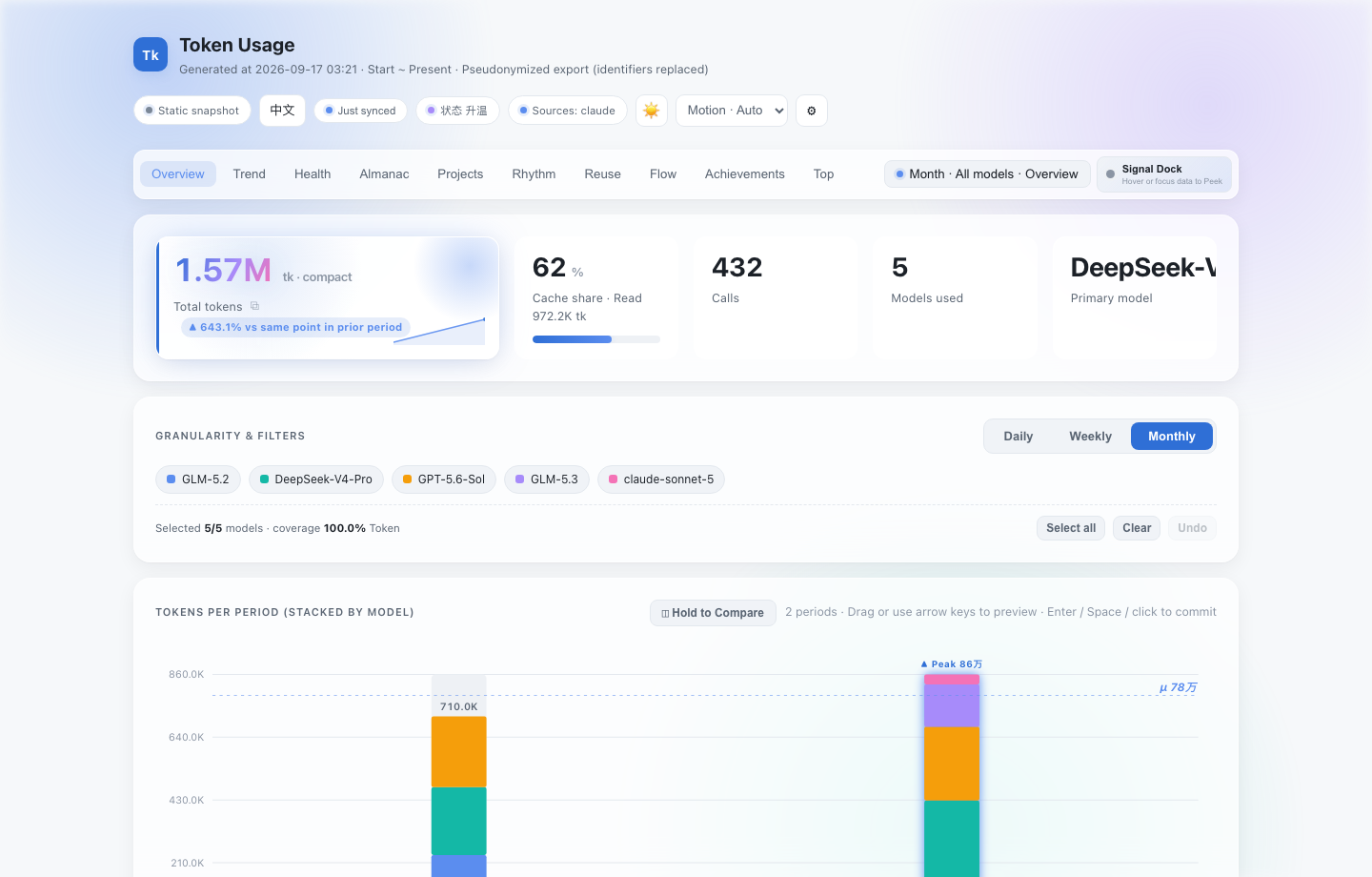
Preview generated by the real dashboard from invented records in an isolated temporary home. It contains no local logs, paths, sessions, or private router configuration.
Why clone it?
AI coding tools already leave useful usage records on your machine, but each tool stores and counts them differently. tokens gives you one inspectable local view:
- Claude Code, Gemini CLI, and Codex in one report
- Daily, weekly, and monthly trends with exact table, CSV, and Markdown views
- Model, source, project, session, context, and activity analysis where source fields allow it
- Live local updates without a full-page reload
- Portable offline snapshots with data, CSS, and JavaScript in one HTML file
- No account, telemetry, hosted backend, database, CDN, or log upload
Unlike hosted usage trackers, tokens reads the logs already present on your computer. Unlike a one-off parser, it keeps terminal output, exact tables, interactive charts, data-quality explanations, and an offline archive on the same aggregation pipeline.
Core parsing, aggregation, reporting, and loopback serving use the Python standard library. Windows installs additionally need the data-only tzdata package for consistent IANA timezone support.
Clone and run
Requirements: Python 3.9 or newer on macOS, Linux, or Windows, plus local logs from at least one supported AI coding CLI.
git clone https://github.com/LingXi-fur/tokens.git
cd tokens
./run doctor
./run serve --open
./run doctor checks paths, candidate file counts, timezone, output, and cache permissions. It does not parse message contents or print project and session identifiers.
The live dashboard binds only to 127.0.0.1. It checks for local log changes every five minutes by default; the page can switch between 1, 5, 15, or 30 minutes, or pause refresh. Unchanged files are not reparsed or retransmitted.
Create an offline archive instead:
./run dashboard --open
Windows source checkout
git clone https://github.com/LingXi-fur/tokens.git
cd tokens
$env:PYTHONPATH = "src"
python -m tokens_cli doctor
python -m tokens_cli serve --open
Windows needs tzdata; install the checkout locally as shown below to resolve it automatically, or install tzdata in the active environment.
Optional local command install
From the cloned checkout, install an editable command into a virtual environment:
python -m venv .venv
source .venv/bin/activate        # Windows PowerShell: .venv\Scripts\Activate.ps1
python -m pip install -e .
tokens doctor
tokens serve --open
This installs from your local checkout. No package-registry release is required by these instructions.
Choose an output
| Goal | Source-checkout command | Behavior |
|---|---|---|
| Quick terminal summary | ./run day | Last 14 days in the terminal |
| Keep a dashboard open | ./run serve --open | Loopback-only service with in-page updates |
| Save an offline archive | ./run dashboard --open | Self-contained generation-time snapshot |
| Prepare a safer sharing copy | ./run dashboard --anonymize --open | Pseudonymizes selected identifiers |
Reports are written to ./out by default. Use --output DIR to choose another location.
What can I explore?
The dashboard starts with overview, granularity, filters, trends, exact details, and data trust. Deeper sections add:
- Token Almanac for local seasons and user-controlled cross-snapshot time capsules
- Achievements for local thresholds, tiers, unlock dates, collection, and progress — never a global ranking
- Project Lens and session replay, retaining at most the most recent 200 turns per session
- Model mix, six generation-time hourly buckets, and a 14-day × 24-hour activity weave
- Context Reuse River for Fresh Input, Output, Cache Read, Cache Write, and Other
- Token Flow with SVG export for real project → model and model → session aggregates
- Work Mode Atlas for explainable local activity patterns
- Data Trail, Signal Dock, and Exactness Key for evidence navigation and precise values
- Markdown, CSV, Almanac JSON, health-summary, Passport, and Receipt exports
Data Trail state remains in page memory and is not written to the URL or localStorage. Projects and sessions stay parallel aggregates rather than being automatically paired. A pinned previous-period comparison may appear in the URL as compare=1; project/session IDs and exact token details do not.
Token change describes usage, not productivity or code quality. Cache Read is cached-token volume, not guaranteed monetary savings.
Supported sources
| Source | Default local path | Project data | Session data | Accounting note |
|---|---|---|---|---|
| Claude Code | ~/.claude/projects/**/*.jsonl | Yes | Yes | Total is input + output + cache read + cache write. |
| Gemini CLI | ~/.gemini/tmp/*/chats/session-*.json | Usually no | Yes | Uses source tokens.total when available. |
| Codex | ~/.codex/sessions/**/rollout-*.jsonl | Usually no | Usually no | Cached input is already included in input and is not added twice. |
Claude is the default source. Repeat --source to combine tools:
./run serve \
  --source claude \
  --source gemini \
  --source codex \
  --open
Different tools do not expose identical token semantics. tokens preserves each source's reported total instead of pretending the values are perfectly interchangeable.
CLI essentials
./run [day|week|month|all|dashboard|serve|doctor] [options]
tokens [day|week|month|all|dashboard|serve|doctor] [options]  # after local install
| Option | Purpose |
|---|---|
--source claude|gemini|codex | Select a source; repeat to combine sources. |
--since YYYY-MM-DD / --until YYYY-MM-DD | Limit the inclusive report range. |
--timezone AREA/CITY | Override the detected system timezone. |
--output DIR | Choose the report directory; default is ./out. |
--html | Add a static HTML report to terminal modes. |
--anonymize | Pseudonymize identifiers in dashboard or live mode. |
--interval SECONDS | Set initial live check interval; minimum 1, default 300. |
--port PORT | Set loopback port; default 8765, or 0 for an available port. |
--open | Open generated file or local URL in the default browser. |
--no-cache | Re-read all selected log files. |
See the complete CLI reference.
Privacy
tokens reads local files and performs analysis locally. Offline snapshots make no network requests. Live mode talks only to its same-origin service on 127.0.0.1 and provides no LAN binding option. When present, ~/.claude-code-router/custom-router.js is read locally as text only; it is never executed or uploaded. Router rules are used only to interpret plain Claude request aliases and never rewrite Gemini or Codex model names.
A normal dashboard may still contain:
- project paths and working directories
- session identifiers and locally derived titles
- exact dates, models, token values, and per-turn token sequences
- behavioral patterns that could identify a person or organization
--anonymize replaces project paths, session identifiers, and natural-language titles with report-scoped aliases. Exact dates, models, token values, relationships, and replay sequences remain. Router-resolved backend names also remain and can reveal local routing configuration. This is pseudonymization, not guaranteed anonymity.
Before sharing a report:
- use
./run dashboard --anonymize - restrict date range
- inspect generated file or screenshot
- search for usernames, customer names, repository names, and custom model labels
- never attach raw logs to a public issue
Read the full data and privacy guide.
Current boundaries
- Public setup currently starts from a source checkout; registry install commands are intentionally not advertised until a verified release exists.
- Claude is the only default source. Gemini and Codex must be selected explicitly.
- Source formats expose different fields, so some project, session, or context views can be unavailable.
- Terminal output and some legacy static-report labels are currently Chinese-first; the interactive dashboard and documentation provide English and Chinese interfaces.
- An offline dashboard is a generation-time snapshot. Use
./run serve --openfor ongoing updates.
Troubleshooting
No logs found? Run ./run doctor. If Claude is not your tool, try ./run day --source gemini or ./run day --source codex.
Dashboard numbers do not change? ./run dashboard creates an offline snapshot. Use ./run serve --open for live updates.
Browser did not open? Command still prints generated path or local URL. Open it manually.
More answers are in the FAQ.
Development
python -m pip install -e .
python -m unittest discover -s tests -v
python -m compileall -q src tests
node --check src/tokens_cli/dashboard_assets/dashboard.js
node --check docs/assets/site.js
Suite covers readers, cache invalidation, packaging, CLI validation, pseudonymization, dashboard contracts, documentation links, accessibility, privacy assertions, and loopback live updates.
Contributing and security
Bug reports and focused pull requests are welcome. Start with CONTRIBUTING.md, and use synthetic records when reproducing a problem.
For vulnerabilities or privacy issues, follow SECURITY.md rather than opening a public issue. Never include raw logs or an unreviewed generated dashboard.
If tokens helps, a star makes it easier for other local-first AI tool users to find. Real platform feedback and bug reports matter even more.
License
Collected info
- ★ 1 stars
- Language: Python
- Source updated: 9/3/2026
Config for your environment
Replace {MCP_ENDPOINT_URL} with this MCP’s endpoint URL (from its repo or docs above). No API key — you connect directly.
Tool
OS
Config file: ~/.cursor/mcp.json
{
  "mcpServers": {
    "mcp-server": {
      "url": "{MCP_ENDPOINT_URL}"
    }
  }
}Paste into mcpServers in the config file. Restart Cursor after saving.
If this MCP is also published on mcpchannel.ai, you can subscribe from Browse and use the gateway config there instead.