
iota
AI terminal for easy IoT and robotics development
Links
README
From the repo.
🤖 Neural Terminal - Intelligent Operations Terminal Assistant
██████████████████████████████████████████████████
We are going to build AI Operating Systems. Before AGI. Join us :)
██    ┌─────┐  ████████ ██  ██ ████████         ██
██    │ ◉ ◉ │    ██     ██  ██ ██               ██
██    │  >  │    ██     ██████ ████             ██
██    └─────┘    ██     ██  ██ ██               ██
██               ██     ██  ██ ████████         ██
██                                              ██
██      █████╗ ██╗       ██████╗ ███████╗       ██
██     ██╔══██╗██║      ██╔═══██╗██╔════╝       ██
██     ███████║██║      ██║   ██║███████╗       ██
██     ██╔══██║██║      ██║   ██║╚════██║       ██
██     ██║  ██║██║      ╚██████╔╝███████║       ██
██     ╚═╝  ╚═╝╚═╝       ╚═════╝ ╚══════╝       ██
██                                              ██
██    ╔═══════════════════════════════════════╗ ██
██    ║ For Builders, From Neural Nirvana     ║ ██
██    ╚═══════════════════════════════════════╝ ██
██                                              ██
██████████████████████████████████████████████████
Your AI-Powered System Administration Companion


Features • Installation • Quick Start • Documentation • Contributing
🚀 What is IOTA?
IOTA (Intelligent Operations Terminal Assistant) is a cutting-edge AI-powered terminal assistant designed for system administrators, DevOps engineers, and tech enthusiasts who want to supercharge their command-line experience. Built for tinkerers and builders who demand both power and elegance.
🎯 Why IOTA?
- 🧠 AI-Native: Leverage GPT-4, Gemini, and other leading AI models directly in your terminal
- 🔧 System-Aware: Deep integration with your system for intelligent monitoring and management
- 🎨 Beautiful UI: Rich terminal interface that makes complex operations intuitive
- 🔌 Extensible: Plugin architecture for custom tools and integrations
- 🛡️ Secure: Local data storage with enterprise-grade security practices
- ⚡ Fast: Optimized for performance with smart caching and async operations
✨ Features
🤖 AI-Powered Intelligence
- Multi-Provider Support: OpenAI GPT models, Google Gemini, and more
- Context-Aware: Understands your system state and provides relevant suggestions
- Natural Language Interface: Ask questions in plain English, get actionable results
- Learning Capability: Remembers previous interactions for better assistance
🖥️ System Administration
- Real-time Monitoring: CPU, memory, disk, network, and process analysis
- Log Analysis: Intelligent parsing and insights from system logs
- Security Audits: Automated security checks and recommendations
- Performance Optimization: System tuning suggestions based on usage patterns
🛠️ Developer Tools
- Code Analysis: Review and optimize scripts with AI assistance
- Deployment Automation: Streamline DevOps workflows
- Environment Management: Virtual environments, containers, and dependencies
- Git Integration: Intelligent version control operations
🎨 User Experience
- Rich Terminal UI: Beautiful, responsive interface with syntax highlighting
- Command History: Smart search and replay of previous operations
- Export Functions: Save sessions, generate reports, and share insights
- Customizable: Themes, aliases, and personalized workflows
🔌 IoT & Edge Computing
- Device Management: Monitor and control connected IoT devices
- Edge Deployment: Deploy and manage edge computing workloads
- Sensor Data: Real-time sensor monitoring and analytics
- Automation: Smart home and industrial automation capabilities
📦 Installation
Prerequisites
- Python 3.8 or higher
- Terminal with UTF-8 support
- OpenAI API key or Google AI API key
Quick Install
# Clone the repository
git clone https://github.com/neural-nirvana/iota.git
cd iota

# Create virtual environment
python -m venv venv
source venv/bin/activate  # On Windows: venv\Scripts\activate

# Install dependencies
pip install -r requirements.txt

# Run IOTA
python main.py
Package Installation (Coming Soon)
pip install iota-terminal
📱 Executable Downloads
Pre-built executables for Windows, macOS, and Linux are available in our Releases section.
🚀 Quick Start
1. First Launch
python app.py
2. Configure Your AI Provider
# In IOTA terminal
config
# Follow the setup wizard to add your API keys
3. Start Exploring
# System analysis
analyze system performance

# File operations
find large files in /var/log

# Process management
show me running python processes

# Quick shell commands
!df -h
!top -n 1

# Ask anything!
help me optimize this server for web hosting
4. Advanced Usage
# Export session
export

# View history
history

# System stats
stats

# Custom automation
create a backup script for my database
🎬 Demo
Basic System Analysis
agent[1]> analyze disk usage and show me the top 10 largest directories

🔍 Analyzing disk usage across your system...

📊 Top 10 Largest Directories:
┌─────────────────────────────────┬──────────┬─────────────┐
│ Directory                       │ Size     │ % of Total  │
├─────────────────────────────────┼──────────┼─────────────┤
│ /var/lib/docker                 │ 15.3 GB  │ 23.5%       │
│ /usr/lib/x86_64-linux-gnu       │ 8.7 GB   │ 13.4%       │
│ /home/user/.cache               │ 4.2 GB   │ 6.5%        │
└─────────────────────────────────┴──────────┴─────────────┘

💡 Recommendations:
• Docker images can be cleaned up with: docker system prune
• Cache directory is large - consider clearing browser caches
• Monitor /var/lib/docker growth for container sprawl
AI-Powered Code Review
agent[2]> review my Python script deployment.py and suggest improvements

📝 Code Analysis Complete!

🔍 Found 3 optimization opportunities:
1. **Security**: Hardcoded credentials detected (line 23)
   → Recommendation: Use environment variables or secrets manager

2. **Performance**: Synchronous HTTP calls in loop (lines 45-52)
   → Recommendation: Implement async/await pattern for 3x speed improvement

3. **Error Handling**: Missing exception handling for network calls
   → Recommendation: Add retry logic with exponential backoff

🚀 Auto-generated improved version saved to: deployment_optimized.py
📖 Documentation
Configuration
IOTA stores configuration in SQLite database for persistence and performance:
# Configuration structure
{
    "agent": {
        "provider": "openai",  # or "google"
        "model": "gpt-4o-mini",
        "temperature": 0.7,
        "max_tokens": 2000
    },
    "ui": {
        "show_tool_calls": true,
        "markdown": true,
        "theme": "default"
    }
}
Available Commands
help- Show available commandsconfig- Configure AI providers and settingsclear- Clear the terminal screenhistory- Show command historystats- Display session statisticsexport- Export conversation to filereset- Start a new sessionexit/quit- Exit IOTA
Special Prefixes
!<command>- Execute shell command directly?<query>- Quick system information query
Tool Integration
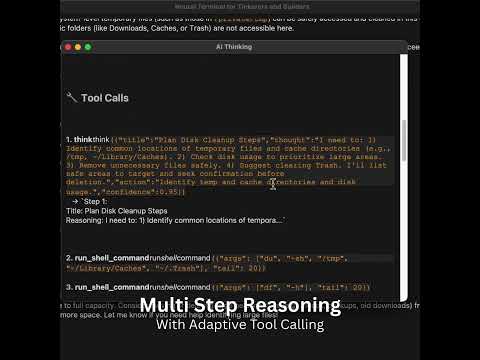
IOTA includes several built-in tools:
- ReasoningTools: AI-powered analysis and decision making
- ShellTools: System command execution and analysis
- FileTools: File system operations and management
- PythonTools: Python code execution and debugging
🏗️ Architecture
graph TB
    A[Terminal UI] --> B[Agent Core]
    B --> C[AI Models]
    B --> D[Tool System]
    B --> E[Storage Layer]

    C --> F[OpenAI GPT]
    C --> G[Google Gemini]

    D --> H[Shell Tools]
    D --> I[File Tools]
    D --> J[Python Tools]
    D --> K[Reasoning Tools]

    E --> L[SQLite DB]
    E --> M[Session History]
    E --> N[Configuration]
🤝 Contributing
We welcome contributions from developers, system administrators, and AI enthusiasts! Here's how you can help:
🐛 Bug Reports
- Use the issue tracker
- Include system information and reproduction steps
- Attach relevant logs from
logs/sita.log
💡 Feature Requests
- Describe your use case and proposed solution
- Check existing issues to avoid duplicates
- Consider implementing it yourself - we provide mentorship!
🔧 Development Setup
# Fork and clone the repository
git clone https://github.com/YOUR_USERNAME/iota.git
cd iota

# Install development dependencies
pip install -e ".[dev]"

# Run tests
pytest

# Format code
black .
isort .

# Submit a pull request!
📋 Development Guidelines
- Follow PEP 8 style guidelines
- Add tests for new features
- Update documentation
- Use conventional commit messages
🗺️ Roadmap
v1.1 - Enhanced Intelligence
- Plugin system for custom tools
- Web interface option
- Docker integration
- Cloud provider integrations (AWS, GCP, Azure)
v1.2 - Enterprise Features
- Multi-user support
- Role-based access control
- Audit logging
- API endpoints for automation
v1.3 - Advanced AI
- Custom model training
- Workflow automation
- Predictive maintenance
- Natural language scripting
v2.0 - Ecosystem
- Mobile companion app
- GUI dashboard
- Marketplace for plugins
- Enterprise SaaS offering
📊 Metrics & Performance
- ⚡ Response Time: < 200ms for local operations
- 🧠 AI Latency: ~1-3s for AI-powered responses
- 💾 Memory Usage: ~50MB base footprint
- 🔋 CPU Impact: < 5% during normal operation
- 📦 Binary Size: ~25MB standalone executable
🌟 Community
Join our growing community of tinkerers and builders:
- Discord: Join our server for real-time discussions
- Reddit: r/NeuralNirvana for tips and showcases
- Twitter: @neural_nirvana for updates
- Blog: blog.neural-nirvana.com for tutorials
🏆 Showcase
Share your IOTA workflows and automations! Submit a PR to add your use case here.
DevOps Automation
"IOTA helped me reduce deployment time by 80% through intelligent error detection and automated rollback procedures." - @devops_ninja
Home Lab Management
"Managing my Raspberry Pi cluster became effortless with IOTA's IoT integration." - @homelabber
Security Auditing
"The AI-powered security recommendations caught vulnerabilities I would have missed." - @77ethers
📄 License
This project is licensed under the MIT License - see the LICENSE file for details.
🙏 Acknowledgments
- Agno Framework - The powerful AI agent framework powering IOTA
- Rich - Beautiful terminal formatting
- OpenAI & Google - AI model providers
- Our Contributors - The amazing developers making IOTA better every day
Made with ❤️ by the Neural Nirvana Team
For tinkerers and builders who refuse to settle for ordinary.
Collected info
- ★ 45 stars
- ⎇ 4 forks
- Language: Python
- Source updated: 3/24/2026
Config for your environment
Replace {MCP_ENDPOINT_URL} with this MCP’s endpoint URL (from its repo or docs above). No API key — you connect directly.
Tool
OS
Config file: ~/.cursor/mcp.json
{
  "mcpServers": {
    "mcp-server": {
      "url": "{MCP_ENDPOINT_URL}"
    }
  }
}Paste into mcpServers in the config file. Restart Cursor after saving.
If this MCP is also published on mcpchannel.ai, you can subscribe from Browse and use the gateway config there instead.